DocsThe ticket
Automations
Remind staff about quiet tickets, close tickets nobody is writing in, and delete closed tickets after a number of days.
Sortr can look after tickets on its own once enough time has passed: remind your staff about a ticket that has gone quiet, close it if nobody writes, and delete closed tickets after a few days. Each one is off until you switch it on.
Dashboard › your server › a panel › Automations
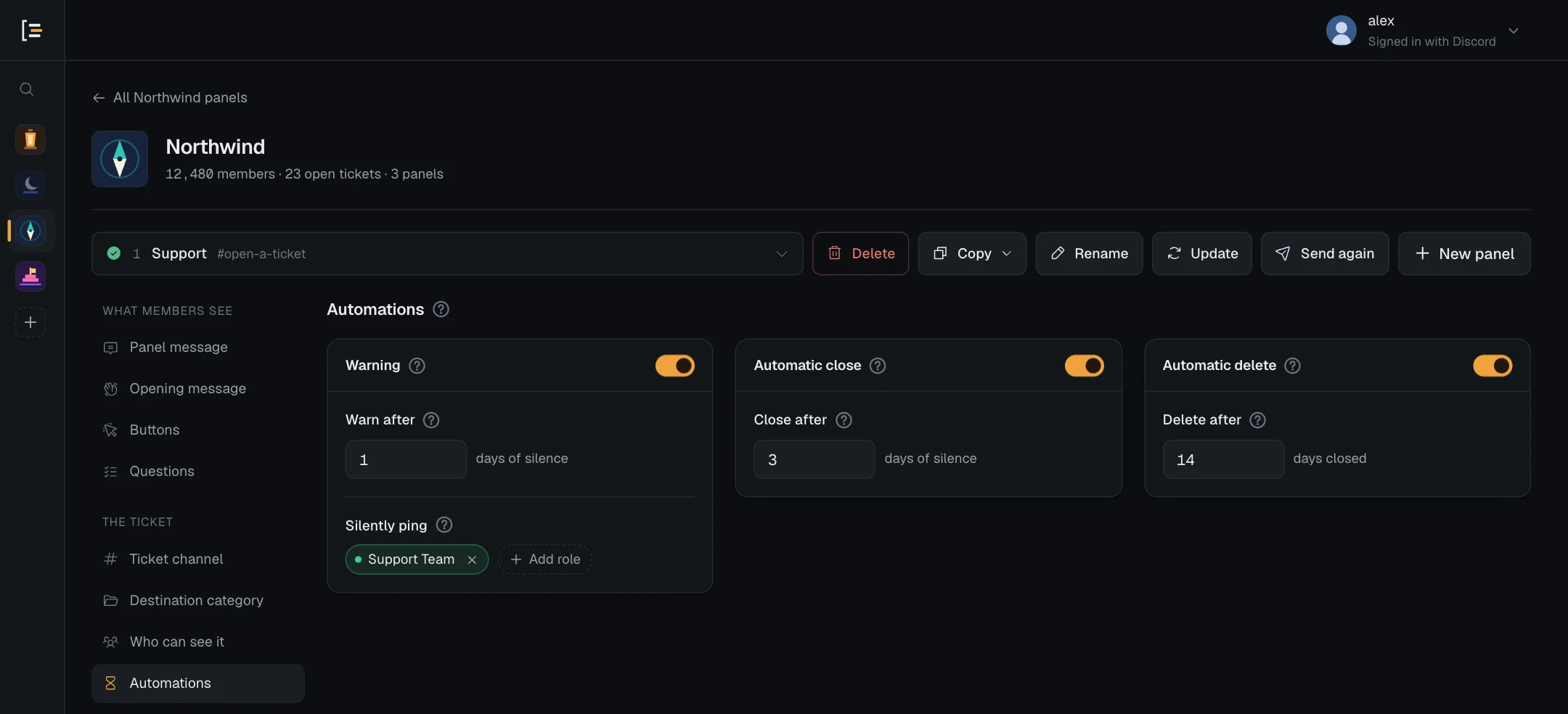
#The three timers
Each card has its own switch. Switching a card off keeps its settings, dimmed, for when you switch it back on.
| Setting | What it does | Default |
|---|---|---|
| Warning · Warn after | Posts a reminder for staff after this many days of silence. Up to 30 days. Parts of a day work, so 0.5 is twelve hours. | Off. Starts at 1 day when you switch it on. |
| Silently ping | The roles the reminder mentions, up to 50. Without one, no reminder is posted. | No roles |
| Automatic close · Close after | Closes a ticket after this many days of silence. Up to 30 days, parts of a day work. | Off. Starts at 2 days when you switch it on. |
| Automatic delete · Delete after | Deletes a closed ticket's channel after it has been closed this many whole days. Up to 365. | Off. Starts at 7 days when you switch it on. |
A length of 0 means that timer never runs, and the card says so, for example Never close on its own. Press Save changes at the bottom of the page when you are done.
#What counts as quiet
A ticket is quiet while nobody writes in it. Any new message in the ticket resets the clock, whoever sends it. That includes Sortr's own notices, such as Member added, but not its reminder. Edits and reactions do not count.
- Reopening a ticket starts the clock again from the moment it reopens.
- Each time it checks, Sortr also looks at the newest message in the channel, so messages sent while Sortr was offline still count.
- Sortr checks about every five minutes, so a reminder or close can come a few minutes after the exact time. Each check closes at most 5 tickets and deletes at most 5 from one server, taking servers in turn, so if a lot are due at once, Sortr works through them over the next few checks.
#Warning
The warning is a reminder for your staff, not for the member. When a ticket has been quiet for Warn after, Sortr posts one message in it that mentions the roles under Silently ping. It is sent as a silent message, so their mention lights up without a push notification. The member is never pinged by it, even if you rewrite the message to include them.
- Switch on Warning. The switch is at the top of the Warning card.
- Set Warn after. In days, for example 1 for a day or 0.5 for twelve hours.
- Pick who to remind. Under Silently ping, press Add role and pick roles that can see the ticket, such as your support roles.
- Save. Press Save changes.
While Warning is on with no role picked, the card says "Pick a role, otherwise nobody is reminded and nothing is posted." and Sortr posts nothing.
The reminder is posted once per quiet spell. It comes again only after someone writes and the ticket goes quiet again. With the default wording it looks like this:
You can reword it as the Quiet ticket reminder under Ticket Messages. When Automatic close is also on, {delay} in that message is the time left before the ticket closes. While it is off, {delay} is empty.
The reminder has to come before the close. If Warn after is the same as or longer than Close after, the screen says "The reminder is due after the automatic close, so it would never be sent. Make Warn after shorter than Close after."
#Automatic close
When nobody has written in a ticket for Close after, Sortr closes it. It works like a close by hand:
- the member, and anyone added with
/add, lose access to the channel. Bots keep their access. If Sortr's role can no longer see the channel, or lacks Manage Permissions there, the ticket is not closed and stays open. The event log then says Could not close a quiet ticket, under Missing Discord permission: "It is past its automatic close, but Sortr can't manage its channel any more. Give Sortr's role View Channel and Manage Permissions there, or close it by hand. Sortr tries again in a day." If Discord refuses Sortr anyway, for example when its role lacks Send Messages there, taking the channel away can fail, and the event log then names who may still be in; - the transcript is saved right after the closed notice, when Save it under Transcripts is set to When the ticket closes (with When the ticket is deleted, nothing is saved at the close);
- the roles under When it closes on Who can see it are applied;
- the channel is renamed and moved, as set on Ticket channel and Destination category.
Instead of the usual closed notice, Sortr posts the Closed for inactivity message in the channel, with the Reopen, Transcript and Delete buttons under it. By default it is titled "Closed automatically" and says "Nobody replied, so Sortr closed this ticket. Reopen it if the issue is still there." The reason recorded on the ticket is the time it was quiet, such as "No activity for 2 days".
You can reword it under Ticket Messages. Besides the usual variables it can use {reason} for that reason, {ticket.duration} for how long the ticket was open, {transcript.link} for the copy saved at the close, and {staff} or {staff.name}, which stand for Sortr, since Sortr closed it.
If you switched on the Close message to the member under Ticket Messages, they get it as a direct message, for automatic closes too, unless they have had several direct messages from Sortr in the last hour, and the log entry then says Sortr is pausing DMs to them for a while.
Your log channel gets a Closed for inactivity entry, with how long the ticket was quiet and how long it was open. This event is on by default. See Event log.
Switching this on also covers tickets that are already quiet, so the first check after you save can close several at once.
#Automatic delete
When a ticket has been closed for Delete after days, counted from the moment it closed, Sortr deletes its channel. It does not matter whether the ticket was closed by hand or automatically. Nobody is asked to confirm, unlike the Delete button.
- Sortr saves a transcript, when one is due. That is every time when the panel's Save it is set to When the ticket is deleted, and otherwise when the ticket has no copy since its last close. The copy goes to the places switched on under Transcripts.
- Sortr posts a last notice. If the Before deletion message is on under Ticket Messages, it goes in the channel next. By default it is titled "Deleting this ticket" and says "This channel and everything in it will be gone in 10 seconds." If you add
{transcript.link}to it, it links to the copy Sortr has saved in step 1. - The log gets a Deleted automatically entry. It says how long ago the ticket closed and the panel's Delete after setting. When step 1 ran, it adds "Transcript saved before deletion", or "The transcript could not be saved before deletion" when the save made no copy. This event is on by default.
- Ten seconds after the notice, the channel is deleted. The conversation in Discord is gone for good.
Reopening a ticket stops the clock. If it is closed again later, the count starts from the new close.
Careful. Automatic delete applies to every closed ticket from this panel, including ones that closed before you switched it on. If you have old closed tickets, the next checks after you save will start deleting them. Keep at least one place switched on under Transcripts if you want a copy of each conversation: with all three off, nothing is saved before the channel goes.
Deleting closed tickets also frees room in your categories and keeps members under the closed-ticket limits on Limits and rules.