DocsAdvanced
Limits and rules
Control how many tickets members can have, who may open them, how often and at what times, and what members are told when Sortr says no.
Limits and rules decide whether a ticket may open at all: how many a member can have, who is not allowed to open one, how soon they can open another, and at what times. When one of them says no, the member gets a short reply only they can see, and nothing is created.
Dashboard › your server › a panel › Limits and rules
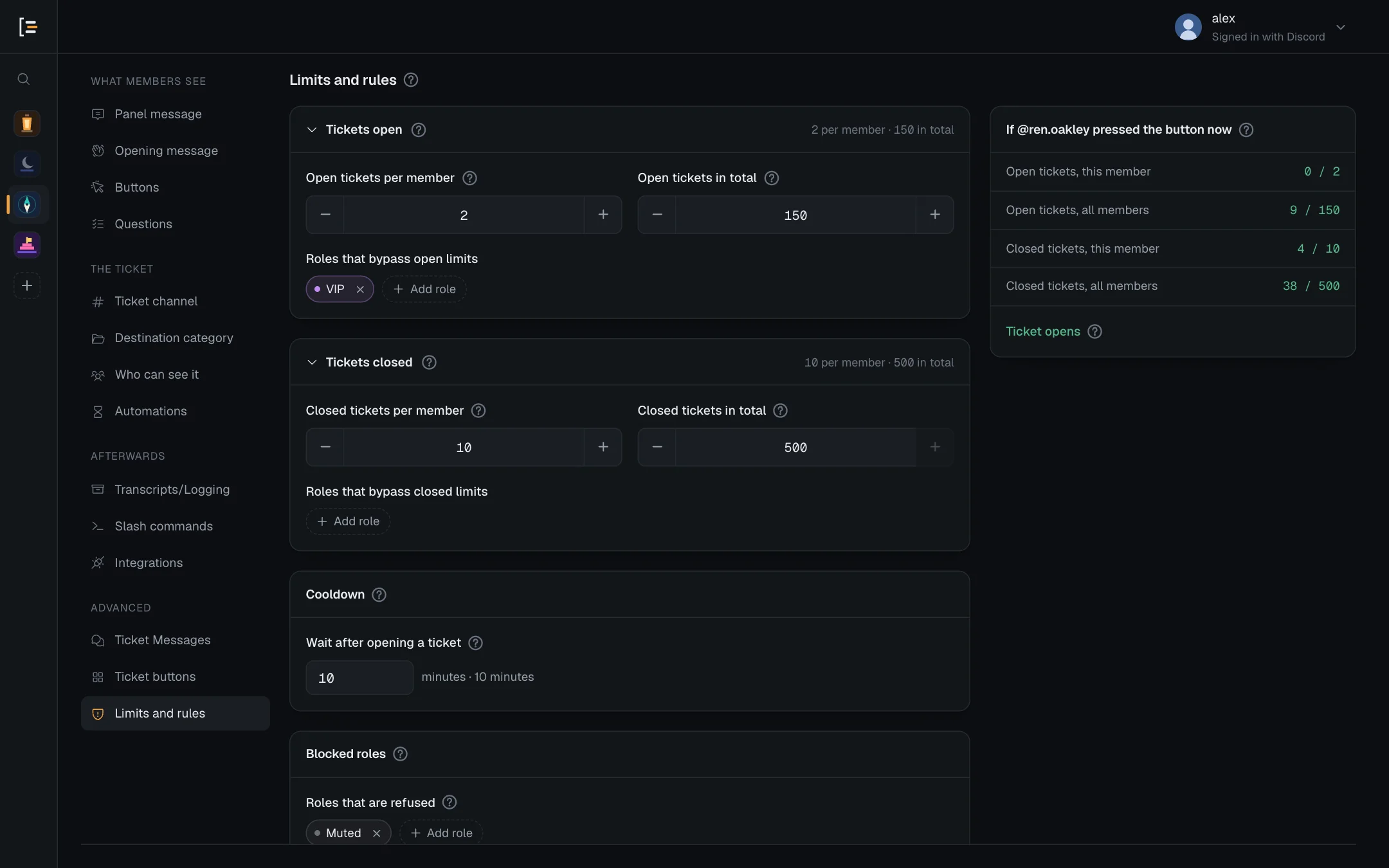
Everything on this screen belongs to the panel you are editing. Hitting a limit on one panel never stops a member opening a ticket from another. Press Save changes at the bottom of the page after any change.
#How many tickets
Two cards count this panel's tickets: Tickets open counts the ones open right now, and Tickets closed counts the ones that are closed but whose channel has not been deleted yet.
| Setting | What it does | Default |
|---|---|---|
| Open tickets per member | How many tickets one member may have open from this panel at once. | 1 |
| Open tickets in total | A ceiling for this panel across everyone. | 500 |
| Roles that bypass open limits | Members with one of these roles skip both open limits and the cooldown. | No roles |
| Closed tickets per member | How many closed, not yet deleted tickets one member may have from this panel before they are refused a new one. | 10 |
| Closed tickets in total | The same across everyone. Helps keep the closed category under Discord's 50-channel limit. | 500 |
| Roles that bypass closed limits | Members with one of these roles skip both closed limits. | No roles |
Each number goes from 0 to 500. The screen warns you if a setting makes no sense, for example "Open tickets per member is zero, so nobody can open a ticket unless they bypass." Each role list on this screen holds up to 50 roles. When one is full, Add role reads Up to 50 roles.
A limit of 0 lets in only the roles that bypass it. So on a panel that gives members a role at or above your own highest role, only the server owner can raise such a limit, or add a bypass role while a limit is 0. An Administrator's save that does is refused with "Only the server owner can let more members get "…", because it is above your highest role. This save would do that by raising a zero limit on open tickets." (or "adding a role that bypasses a zero limit on open tickets", and "closed tickets" for the closed limits).
- Limits are checked only when someone opens a ticket. Lowering one never closes a ticket that is already open, and reopening a closed ticket is not checked against them.
- A ticket whose channel was deleted, by Sortr or by hand in Discord, no longer counts.
- The two totals are checked once more as the ticket is saved, so members pressing at the same moment cannot take the panel past them. Whoever comes second sees their new channel appear for a moment and go, with "This panel has just filled up, so no ticket was opened. Try again once a ticket is closed." (or, for closed tickets, "This panel is holding as many closed tickets as it allows, so no ticket was opened. Let the server's staff know."). These replies cannot be reworded and are not logged.
- The card If @ren.oakley pressed the button now runs your numbers against a made-up member and marks the check that would refuse them with Stops here.
Good to know. With the default of 10 closed tickets per member, a member who has had ten tickets from this panel closed, and none deleted, is refused an eleventh. Delete old tickets, raise the number, or switch on Automatic delete.
#Cooldown
Wait after opening a ticket is a pause, in minutes, between one ticket and the next from the same member. The default is 5 minutes. Set it to 0 to switch it off, or as high as 10,080 minutes (7 days).
It is counted from the moment their last ticket from this panel opened, whether or not that ticket has closed since. A ticket from a different panel does not start the clock. Members with a role under Roles that bypass open limits skip the cooldown too.
#Blocked roles
Members holding any role under Roles that are refused cannot open a ticket from this panel at all. Give that role to someone who abuses tickets. Nobody is exempt: not bypass roles, not your support team, not admins. Staff cannot open a ticket for them with /new either.
When a button or menu on one panel's post opens a ticket in another panel, the blocked roles of both panels apply: the panel whose post was pressed, and the panel the ticket opens in.
On a panel that gives members a role at or above your own highest role, only the server owner can take a role off this list. An Administrator's save that does is refused with "Only the server owner can let more members get "…", because it is above your highest role. This save would do that by removing a blocked role." See Who can pick which roles.
#Support hours
With Support hours switched on, tickets can only be opened inside the hours you set. Outside them the panel still shows its buttons; pressing one is what gets refused.
- Switch on Support hours. The card then shows Open right now or Closed right now.
- Set the times. Type a time into Opens at and Closes at, or press the clock button in the box to pick from a list of half hours in 24-hour time, from 00:00 to 23:30. They start at 09:00 and 17:00.
- Set the time zone. Open Time zone and search by city or region, like Paris, or by offset, like GMT+2. Your browser's own zone is first on the list. A zone has to be picked from the list, and it starts on UTC. The Google Sheet's Submitted at uses the same zone, and can set it too.
- Pick the days. Press each day under Days to turn it on or off. Monday to Friday are on to begin with.
- Save. Press Save changes.
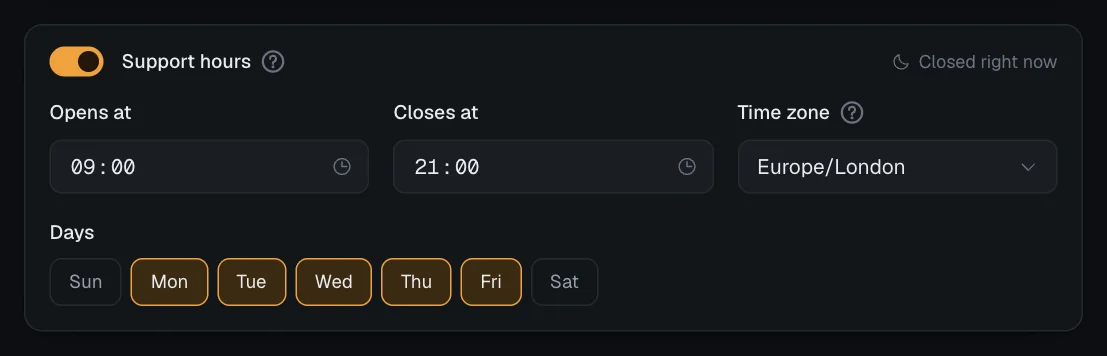
- A window that crosses midnight, like 22:00 to 06:00, works, and belongs to the day it starts on. With Friday on, it stays open until 06:00 on Saturday, whether or not Saturday is on. The hours after midnight count only when the day before is on.
- The same time for Opens at and Closes at means open all day on the days you picked.
- With no days picked, the card warns "No days are selected, so nobody can ever open a ticket." and Save changes is blocked until you pick a day or switch support hours off.
- A time left empty or incomplete gets "Times need to look like 09:00." and blocks the save too.
- A time zone Sortr does not recognise, such as one saved earlier that your browser does not know, is named in red, and the save bar says "Support hours: the time zone is not one Sortr recognises. Pick one from the list." until you pick one from the list or switch support hours off.
Support hours apply to everyone, including bypass roles and admins.
#The order Sortr checks in
When someone presses a button or picks from the menu, Sortr runs these checks in order and stops at the first one that refuses:
- The option's Who can use it, set under Buttons › Access and roles (see Buttons).
- The server is nearly out of channels (see Destination category).
- Blocked roles.
- Support hours.
- Cooldown.
- Open tickets per member, open tickets in total, closed tickets per member, closed tickets in total.
When an option opens another panel's tickets, the blocked roles of both panels apply. Those of the panel whose post was pressed are checked first of all, before Who can use it.
If the panel asks Questions, the checks run before the form opens and again when it is sent, so a form left open for an hour is still held to the rules. A ticket opened with /new skips the first check, since no option is pressed. When /new is refused, the person who ran it gets the reason in their own reply, such as "Not opened: @ren.oakley already has 1 open, and the limit is 1."
#What members are told
A refused member gets a reply only they can see. No channel is created and no staff are pinged. You can reword each reply under Ticket Messages, in the group When a ticket cannot open.
| Why | Message | Default wording |
|---|---|---|
| Open limit, per member | Open ticket limit reached | You already have a ticket open. You can have {limit} open at a time in {server.name}. Carry on in the one you have, or close it and open a new one. |
| Open limit, all members together | Panel is full | Support is busy. We're handling as many tickets as we can right now. Please try again later. |
| Closed limit, per member or in total | Closed ticket limit reached | Too many closed tickets. Closed tickets in {server.name} are still waiting to be cleared out, and the limit of {limit} has been reached. Ask the support team to delete some, then try again. |
| Cooldown | Opening too quickly | One moment. You can open another ticket in {delay}. |
| Blocked role | Blocked from opening tickets | You cannot open a ticket. Support has restricted ticket access for your account. Contact a server admin if this is wrong. |
| The option is set to certain roles, and they do not qualify | Not for their role | You can't open this kind of ticket. This option is for certain roles only. Pick another one, or ask a server admin if you think this is wrong. |
| Outside support hours | Outside support hours | Support is closed right now. Nobody is on shift right now. Come back during support hours and open a ticket then. |
| Server nearly out of channels | Built in, cannot be edited | Tickets cannot be opened right now because this server is almost out of channels. Please let a moderator know. |
In the default wording, the first sentence is the embed's title. {limit} is the limit that was hit and {delay} is the time left, such as "3 minutes". Here is the cooldown reply as a member sees it:
When the option sits on another panel's post, the Not for their role reply is the one written on that panel, the one whose post was pressed.
Staff can see refusals in the log channel as Open refused entries. Each reason is its own event under Transcripts/Logging › Event log: Blocked member tried is on by default and covers both a blocked role and an option that is not for the member's role. Ticket limit reached, Cooldown hit and Outside support hours are off until you switch them on. A member who is refused again and again for the same reason is logged once every 10 minutes. See Event log.
#Safety limits
A few limits apply to the whole server and cannot be changed: how quickly one member can press Sortr's buttons, how many tickets they can open in a row, and how many channels Sortr creates in a minute. They stop one member, or a macro on the button, from flooding a server with channels, and bypass roles do not skip them. Sortr also stops opening tickets once the server has 470 channels, not counting threads (see When the server is nearly out of channels).
Each one, with what the member sees, is on Limits reference.