DocsThe ticket
Ticket channel
Choose what ticket channels are called while open and once closed, how tickets are numbered, and whether Sortr pins the opening message.
Every ticket is a private text channel. This screen decides what that channel is called while it is open, what Sortr renames it to when it closes, how the ticket number looks, and whether Sortr pins its first message.
Dashboard › your server › a panel › Ticket channel
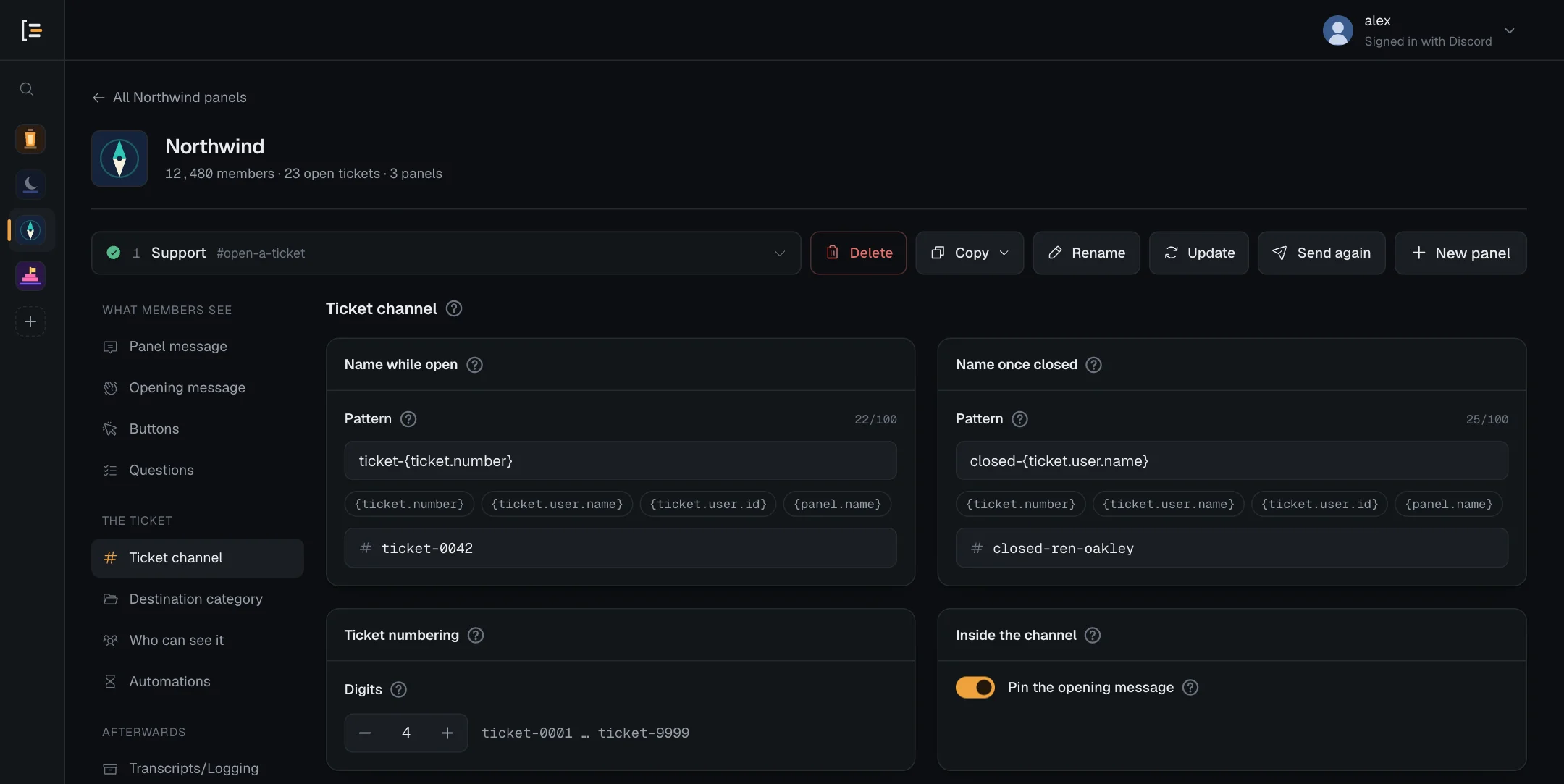
#Channel names
There are two names, each on its own card:
- Name while open is used when Sortr creates the channel, and again if a closed ticket is reopened. The default is
ticket-{ticket.number}, which gives channels like #ticket-0042. - Name once closed is applied when the ticket closes, so finished tickets are easy to tell apart. The default is
closed-{ticket.user.name}, so a ticket opened by ren.oakley becomes #closed-renoakley.
#Change a name
- Open the panel. In the dashboard, pick your server, then the panel.
- Go to Ticket channel. It is in the left menu under The ticket.
- Edit the pattern. Type in the Pattern field. To add a variable, press it in the row under the field and it is added to the end.
- Check the preview. The line starting with # shows the name as it will appear in Discord, filled in with a sample member (renoakley) and ticket 0042.
- Save. Press Save changes at the bottom of the page.
Saving does not rename channels that already exist. The new pattern is used the next time Sortr names a channel: when a ticket opens, closes or is reopened.
#Variables in channel names
| Variable | Becomes | Example |
|---|---|---|
{ticket.number} | The ticket number, padded to your Digits setting | 0042 |
{ticket.user.name} | The Discord username of the member who opened it, not their display name in your server. The dots in it are left out. | renoakley |
{ticket.user.id} | That member's Discord ID | 100000000000000001 |
{panel.name} | The name of the panel the ticket came from | billing-purchases |
You can also write {user.name} and {user.id}, the spellings used in messages. In a channel name they mean the same thing, so {user.name} is the username here too, while in messages it is the display name. Channel names only understand these variables. The full list for messages is on Variables.
Good to know. All four variables are filled in every time Sortr names the channel: when the ticket opens, closes and is reopened. {panel.name} is the panel's name at that moment, so a renamed panel shows in the next rename. If the member has left the server by the time their ticket closes, {ticket.user.name} becomes member.
#How names are tidied
Discord only accepts a narrow set of characters in a text channel name. Sortr tidies the name the same way before it creates the channel, so the preview is exactly what members see:
- Capital letters become lowercase, and accents are removed, so é becomes e.
- Spaces and underscores become hyphens, and several hyphens in a row become one.
- Anything that is not a letter, a digit or a hyphen is dropped. That includes emoji, full stops and other punctuation. Letters and digits of other alphabets, such as Cyrillic or Japanese, stay.
- Hyphens at the very start or end are removed.
- The result is cut to 100 characters. The pattern itself can be up to 100 characters long.
So {panel.name}-{ticket.number} for a panel called Billing & purchases gives #billing-purchases-0042.
#Blank and invalid patterns
A pattern may be left blank. The preview then shows what Sortr does instead:
- Name while open left blank: Sortr names each new ticket
ticket-and its number, and gives a reopened ticket that name back. - Name once closed left blank: a closed ticket keeps the name it had while open.
A pattern you typed that leaves nothing Discord would accept, such as one made only of punctuation or emoji, shows invalid name in red with "This leaves nothing Discord accepts as a channel name. Add letters, numbers or a variable." Save changes is blocked until you fix it or clear the field.
A pattern can pass that check and still come out empty when Sortr fills it in, for example a pattern of only {panel.name} on a panel whose name is all emoji. Sortr then does what it does for a blank pattern: a new or reopened ticket is named ticket- and its number, and a closing ticket keeps its name.
Discord lets a channel be renamed only twice every ten minutes. If a ticket is closed and reopened several times in quick succession, Sortr skips a rename rather than wait, so the name can be out of date until the next close or reopen. Sortr writes each skipped rename to the event log under Something went wrong, with "Discord allows two renames per channel every ten minutes, so this one was skipped. Rename it by hand if the name matters." A rename or move refused for a missing permission is logged under Missing Discord permission instead.
#Ticket numbering
Every ticket gets a number. It counts up across the whole server and is shared by every panel: if one panel opens ticket 41, the next ticket from any panel is 42. The first ticket in a server is number 1.
Numbers are never reused. A number is used up even when a ticket fails to open, so you may see the odd gap.
Digits sets how many digits the number is padded to with leading zeros, from 1 to 6. Change it with the minus and plus buttons beside the number. The default is 4.
| Digits | Ticket 1 | Ticket 42 |
|---|---|---|
| 1 | ticket-1 | ticket-42 |
| 3 | ticket-001 | ticket-042 |
| 4 (default) | ticket-0001 | ticket-0042 |
| 6 | ticket-000001 | ticket-000042 |
Padding never cuts a number short. With 4 digits, the ticket after ticket-9999 is ticket-10000. Changing Digits does not rename channels that already exist. A ticket picks up the new number of digits the next time Sortr renames it, when it closes or is reopened.
#Inside the channel
As soon as the channel exists, Sortr:
- sets the channel topic to the ticket number, the member's Discord username and the panel's name, for example "Ticket 0042 · opened by ren.oakley · panel Billing";
- posts the opening message with the Close button under it. You write that message under Opening message, and set the button under Ticket buttons. If the panel asks Questions and Show answers in the ticket is on, the answers are added to it;
- pins that message, if Pin the opening message is on;
- posts a copy of the files the member attached to any question that takes files, one message per question under the opening message. Sortr's role needs Attach Files for this. Without it, the event log says "Sortr could not post the files attached to a form", under Missing Discord permission, and suggests giving Sortr's role Attach Files in Server Settings › Roles, or pressing Re-add Sortr in the dashboard. See Questions.
#Pin the opening message
On by default. Sortr pins its first message so the details and the Close button stay one click away, however long the conversation gets. Sortr pins it itself, so your staff need no extra permission. Sortr's role needs Pin Messages for this, which the invite asks for. If the pin fails, the ticket still opens, unpinned. When Pin Messages is what is missing, the event log says "Sortr could not pin the opening message", under Missing Discord permission, and suggests giving Sortr's role Pin Messages in Server Settings › Roles (or pressing Re-add Sortr) or switching this off. See Permissions.
Who can see the channel is set on Who can see it, and which category it is created in on Destination category.