DocsReference
Permissions
The permissions Sortr asks for when you add it and what each is for, what Sortr's role needs in private categories and channels, what stops working when something is missing, who can pick which roles, and servers that require 2FA.
When you add Sortr to a server, Discord lists the permissions Sortr uses, each with a tick box: the 18 that tickets need, View Audit Log and Change Nickname. Sortr works wherever its role can see, with what its role holds. This page says what each permission is for, what Sortr's role needs in private categories and channels, and what stops working when something is missing. It ends with the rules for people: which roles an Administrator can hand out through Sortr, and what changes in a server that requires 2FA for moderators.
#How Discord decides what Sortr can do
Most of what Sortr does is set permissions on ticket channels for your staff and members. Three of Discord's rules decide how far that goes.
| Discord's rule | What it means for Sortr |
|---|---|
| A bot cannot give a permission in a channel unless it holds that permission itself. | A ticket only gets the permissions Sortr's role holds. Anything else you set in the permission grid on Who can see it is left off the ticket, and your log channel says what. That is why the invite lists every permission a new panel's settings use. |
| Only an Administrator can put Manage permissions on a channel. | Manage permissions in the grid is left off every ticket, set to Allow or to Deny. |
| A bot only sees and works in the channels its role is let into. | A private category or channel a panel uses needs Sortr's role let in, in that place's own permissions. See Private categories and channels. |
Sortr does not ask for Administrator. A server that gave it to Sortr's role before keeps it until someone takes it off, and an admin may give it by hand. There, these three rules do not limit Sortr.
The role order applies whatever Sortr's role holds: Sortr only gives or takes roles that sit below its own. See Role hierarchy.
The invite also asks Discord to let Sortr add its slash commands to your server. Adding Sortr creates no channels, and posts nothing until you send a panel, apart from its welcome message. It adds one command straight away, /help, which tells the server owner and Administrators where Sortr is set up, and other members how to open a ticket.
#The permissions on the invite
Discord's screen lists 20 permissions, each with its own tick box: the 18 Sortr uses, View Audit Log and Change Nickname. The 18 are View Channel, Manage Channels, Manage Roles, Send Messages, Embed Links, Attach Files, Read Message History, Pin Messages, Mention Everyone, Manage Messages, Add Reactions, Use External Emoji, Use External Stickers, Send Text-to-Speech Messages, Create Public Threads, Create Private Threads, Send Messages in Threads and Use Application Commands. Discord sometimes words these a little differently on its own screens. Sortr's role gets the ones left ticked.
View Audit Log is there only to see who added Sortr. When Sortr joins a server, it reads the audit log to leave if the account that added it is blocked, and to send that person the welcome message by direct message when it can't post it in the server. Without View Audit Log, Sortr stays and works as usual, but can do neither. Change Nickname is there only for Display name under Customize bot, which Discord keeps as Sortr's nickname in your server. Nothing in a ticket uses either of the two, and the warning that Sortr can't reach everything does not ask for them.
Six permissions are not on the list, because only optional settings use them: Manage Webhooks, Create Invite, Send Voice Messages, Create Polls, Manage Threads and Use External Apps. When Sortr's role lacks them, Sortr leaves them off a ticket and logs it. To use them in tickets, switch them on for Sortr's role in Server Settings › Roles. The two tables below say what each permission is for, and whether it is on the invite.
#What Sortr needs where
Sortr works wherever its role can see, with what its role holds. Two things decide that:
- Its role's permissions in the server, under Server Settings › Roles. Adding Sortr gives its role the permissions left ticked on Discord's screen, and someone can switch one off later.
- The permissions of each private category or channel. A place hidden from @everyone needs Sortr's role let in there. Private categories and channels lists what it needs in each.
When something a panel needs is out of reach, the server's page and every panel's editor show a warning at the top: "Sortr can't reach everything your panels use." and "Tickets there may not open, move or log as set up. Let Sortr's role into each place named here, and re-add Sortr for a missing permission." It names each problem, for example "Sortr's role is missing Pin Messages." or "Support opens tickets in a private category: Sortr needs View Channel, Manage Channels there.", up to six, then "And 2 more." or however many are left. It has Re-add Sortr and Check again, with the line "By adding Sortr to a server, you agree to the Terms of Service and the Data Processing Terms for it." under them. With nothing out of reach there is no warning at all. See Fix what is missing.
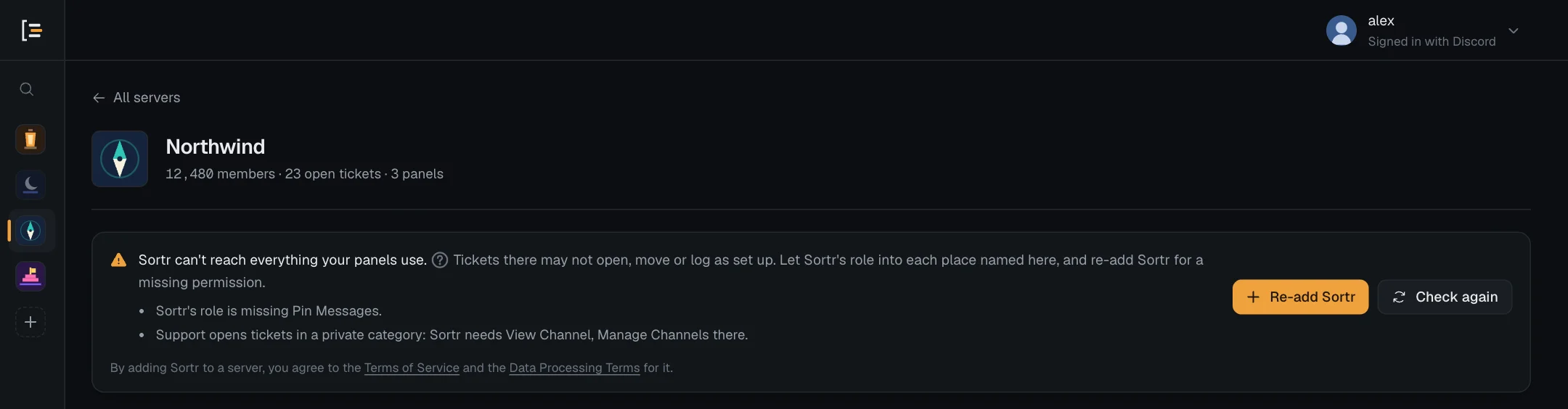
As long as Sortr can create the channel and keep it private, a ticket still opens when a setting uses a permission Sortr lacks: that permission is left off the ticket, whether you set it to Allow or to Deny. For a permission the invite asks for, your log channel says which ones were left out. A permission left off the ticket falls back to what each person has in the server.
The entry only names permissions the invite asks for, which Re-add Sortr gives back. The six that are not on the invite are left off a ticket without a log entry when Sortr's role lacks them. For example, the Contributor access level denies Manage webhooks, Create invite and Manage threads: without them, Sortr leaves those denials off, and each person keeps what they have in the server. Switch them on for Sortr's role in Server Settings › Roles if your staff should be held to them in tickets.
Even when Sortr's role holds all 18, four limits remain, all from Discord's rules. Manage permissions in the grid is left off every ticket. Private categories and channels have to let Sortr's role in. Sortr sees only the Ticket Tool tickets its role is let into: to take over the rest, give its role Administrator by hand for the switch (you can take it off afterwards), or let it into each ticket channel (see Switching from Ticket Tool). And the six permissions not on the invite are left off tickets unless its role holds them.
#What Sortr uses itself
| Permission | On the invite | What Sortr uses it for |
|---|---|---|
| View Channel | Yes | Seeing the categories and channels it works in. Sortr also needs it in the server to keep a new ticket hidden from @everyone and let itself in. |
| Manage Channels | Yes | Creating ticket channels in your categories, renaming them, moving them between categories, and deleting them. Also creating the next category when Create a new category when these are full is on. |
| Manage Roles | Yes | Giving and taking the roles on your open and close lists, and the roles an option gives or removes. Also changing who can see a ticket after it opens: taking the member out when it closes, letting them back in on reopen, /add and /remove, and updating tickets when you change support roles. In a channel's own settings, Discord calls this Manage Permissions. |
| Send Messages | Yes | Posting panels, the opening message, notices, log entries and transcripts. |
| Embed Links | Yes | Most of Sortr's messages are embeds. Sortr checks for it before posting in the log and transcript channels. |
| Attach Files | Yes | Attaching the transcript file when it posts a transcript: in the transcript channel, or in the log channel when no transcript channel is set. Also posting, in a new ticket, the files a member attached to a form's file questions (see Questions). |
| Read Message History | Yes | Reading a ticket's conversation to save its transcript, and finding the panel post again to update it. Send panel and Update check for it in the panel's channel. |
| Pin Messages | Yes | Pinning the opening message, when Pin the opening message is on, and its copy of the first message in a Ticket Tool ticket it takes over. |
| Manage Messages | Yes | Removing Ticket Tool's panel message when you replace it with Sortr's, and Ticket Tool's first message in a ticket Sortr takes over. See Switching from Ticket Tool. |
| Mention Everyone | Yes | Pinging your support roles in the opening message, including a role that does not let everyone mention it. |
| View Audit Log | Yes | Seeing, when it joins a server, who added it. See above. |
| Change Nickname | Yes | Changing Sortr's name in your server, under Customize bot › Display name. It counts when Sortr gets it from @everyone or from any role it holds. |
All but View Audit Log and Change Nickname also appear in the permission grid, so you can give them to people in tickets. Manage Roles appears there as Manage permissions, and Mention Everyone as Mention @everyone, @here and all roles.
#What Sortr only passes on
Sortr does not use these itself. It needs them so that the permission grid works, and only puts them on ticket channels, for the roles and members you choose. The ones on the invite are there because the settings a new panel starts with allow or deny them for the ticket owner and the support team. The others are used only if you choose them: the Contributor and Viewer access levels deny some of them, and you can set any of them by hand.
| Permission | On the invite | What it lets people do in a ticket |
|---|---|---|
| Add Reactions | Yes | React to messages. |
| Use External Emoji | Yes | Use emoji from other servers. |
| Use External Stickers | Yes | Use stickers from other servers. |
| Send Text-to-Speech Messages | Yes | Send messages that are read aloud. |
| Create Public Threads | Yes | Branch a thread off a message. |
| Create Private Threads | Yes | Start a thread only invited people can see. |
| Send Messages in Threads | Yes | Post inside those threads. |
| Use Application Commands | Yes | Run slash commands, including Sortr's own, such as /close. |
| Manage Webhooks | No | Create and edit webhooks in the ticket channel. |
| Create Invite | No | Make an invite link that leads straight into the ticket. |
| Send Voice Messages | No | Record and send a voice note. |
| Create Polls | No | Start a poll. |
| Manage Threads | No | Rename, archive, lock and delete threads. |
| Use External Apps | No | Use apps installed on their own account. |
Manage Messages and Mention Everyone, in the table above, reach tickets the same way: a new support role gets Manage Messages, and Mention Everyone is denied to the ticket owner and the support team.
Manage permissions in the grid is the exception. Discord lets only an Administrator put it on a channel, so Sortr leaves it off every ticket, whichever way you set it, and the log says nothing about it. Holding Manage Roles does not change that.
#What stops working when something is missing
Each row is something Sortr's role can lack, in the server or in one place, and what happens then.
Sortr reports most problems in your log channel under two events that are on by default: Missing Discord permission and Something went wrong. Set the log channel under Transcripts/Logging › Event log (see Event log). The entry titles are in bold below.
| If Sortr is missing | What happens | In the log |
|---|---|---|
| Manage Channels in the server | No ticket opens from any panel. The member is told "Sortr can't open tickets here right now. Let the server's staff know." | Sortr is missing a permission: Sortr's role needs Manage Channels to create ticket channels, then "Give Sortr's role Manage Channels in Server Settings, Roles, or press Re-add Sortr on this server's page in the dashboard." |
| View Channel in the server | Sortr cannot hide a new ticket from @everyone or let itself in, so no ticket opens. The member gets the same reply. | Sortr cannot make a ticket private: Sortr needs View Channel in the server, with the same two ways to give it back: Server Settings › Roles, or Re-add Sortr. |
| View Channel or Manage Channels on a destination category | While that category is the one new tickets go to, no ticket opens from the panel. The member gets the same reply. | Sortr cannot open tickets in that category, naming the category and what is missing. |
| A permission your ticket settings use | The ticket opens without it. | Sortr cannot grant every permission, listing what the ticket opened without, for permissions the invite asks for. Nothing for the six that are not on it. |
| Manage permissions set in the grid, which only an Administrator can put on a channel | The ticket opens without Manage permissions. | Nothing |
| Embed Links or Send Messages in a new ticket | Without Embed Links, Sortr posts a plain opening message instead. If it cannot post at all, it removes the channel and tells the member "Sortr could not post in the new ticket, so it was removed. Let the server's staff know." | A ticket did not open cleanly, with the step that failed. |
| Pin Messages in a new ticket | The opening message is not pinned. The ticket opens anyway. | Sortr could not pin the opening message |
| Attach Files in a new ticket, when the form has a question that takes files | The files the member attached are not posted in the ticket. The ticket opens anyway. | Sortr could not post the files attached to a form: "Give Sortr's role Attach Files in Server Settings, Roles (or press Re-add Sortr in the dashboard), so the files members attach reach the ticket." |
| Manage Roles (Manage Permissions) or View Channel on a ticket being closed | The ticket stays open. Whoever closes it is told "Sortr can't manage this ticket's channel any more, so it can't close it. Let the server's staff know." | Nothing |
| Discord refusing Sortr on a ticket being closed, although its role can see and manage the channel | The ticket owner, or someone added with /add, may still be able to read or write in the closed ticket. | Could not lock the ticket owner out, or Could not lock everyone out of a closed ticket when only added members are still in, naming who may still be in. |
| Manage Roles (Manage Permissions) on a ticket being reopened | The ticket owner, or members added before the close, stay locked out. | Could not let everyone back into a reopened ticket, naming who is still locked out. |
Manage Roles (Manage Permissions) or View Channel on a ticket, for /add | Nobody is added. /add answers "Sortr can't add people to this ticket: it needs Manage Permissions on the channel. A server admin can fix that." | Could not add a member |
Send Messages or Read Message History on a ticket or channel, for /add | The member or role is added without what Sortr cannot give. | A member was added with less access or A role was added with less access, listing what was left out. |
Manage Roles (Manage Permissions) on a ticket, for /remove | The person stays in. /remove answers "Sortr can't take @member out of this ticket: it needs Manage Permissions on the channel. A server admin can fix that." | Could not remove a member |
| Manage Roles (Manage Permissions) on existing tickets, when you change a panel's support roles | Those tickets keep their old support roles. A role you took off the panel may still be able to read them. | Support roles not updated on every ticket, naming the tickets. |
| Manage Roles, or a role high enough | Roles on your open and close lists, and the roles an option gives or removes, are not changed. | Roles updated marks them "(failed)". This event, Role triggers ran, is off by default. |
| Manage Channels on a ticket being deleted | The channel stays, and Sortr does not try again. | Sortr could not delete a ticket channel |
| View Channel or Manage Channels on a ticket being closed or reopened, or on the category it moves to | The ticket is not renamed or moved. | Could not rename a ticket or Could not move a ticket, with the change that did not happen and what Sortr needs. |
| View Channel, Send Messages, Embed Links or Attach Files where transcripts post: the transcript channel, or the log channel when no transcript channel is set | The transcript is not posted there. | Sortr is missing a permission: Sortr needs View Channel, Send Messages, Embed Links and Attach Files there. |
| View Channel, Send Messages or Embed Links in the log channel | Nothing is posted in the log channel. | Nothing, since the log is what is missing. The Event log tab names the channel "(Sortr can't see it)" or "#channel (Sortr cannot post here)", with a red note saying what to give Sortr there. |
| View Channel, Send Messages, Embed Links or Read Message History in a panel's channel | Sortr cannot post or update the panel there. Send panel answers "Sortr can't post in that channel. Give its role View Channel, Send Messages, Embed Links and Read Message History there." and Update "Sortr can't reach that channel any more. Give its role View Channel, Send Messages, Embed Links and Read Message History there." Without View Channel, the dashboard marks the panel as needing attention: "Sortr can no longer see #channel, so it cannot keep the panel up to date." | Nothing |
| View Channel, Read Message History, Send Messages, Embed Links, Attach Files, Pin Messages, Manage Messages, Manage Channels or Manage Roles (Manage Permissions) in a Ticket Tool ticket | Sortr does not take it over. The list of Ticket Tool's tickets says "Sortr can't take this one over: it needs … in this channel. Let Sortr's role in with them in the channel's permissions, or give Sortr's role Administrator for the switch.", naming what is missing. | Nothing |
| Change Nickname | Display name under Customize bot does not save. The dashboard says "Sortr's role needs the Change Nickname permission in this server to change its display name." | Nothing |
The dashboard helps you avoid some of this. Its lists of channels and categories leave out the ones Sortr cannot see. When you send a panel, a channel Sortr can see but not post in is greyed out and says "Sortr cannot post here". The list for the log channel leaves out channels Sortr cannot post in, and the list for the transcript channel also leaves out channels where it cannot attach files. A channel already saved that Sortr can no longer use is named on its tab: on Transcripts, "(Sortr can't see it)" or "#channel (Sortr can't post here)", and on Event log as in the table.
#Fix what is missing
What to do depends on what the warning or the log entry names:
- A permission missing from Sortr's role, such as "Sortr's role is missing Pin Messages.": press Re-add Sortr on the warning, on the server's page in the dashboard. Discord's page opens with your server already picked and asks again for the permissions Sortr uses; leave them ticked and confirm. Sortr stays in the server with its panels and tickets. Or, in Discord, open Server Settings › Roles, pick Sortr's role and switch the permission on. Log entries such as Sortr is missing a permission and Sortr cannot make a ticket private name both ways.
- A private category or channel, such as "Support opens tickets in a private category: Sortr needs View Channel, Manage Channels there.": in Discord, open that category's or channel's settings, go to Permissions, add Sortr's role and allow what is named. Re-adding Sortr does not reach these: only the place's own permissions let its role in. See Private categories and channels.
- One of the six not on the invite, or Change Nickname after it was switched off: switch it on for Sortr's role in Server Settings › Roles.
Then press Check again. The warning goes once Sortr can reach everything your panels use. Every ticket opened from then on gets what your settings say. Tickets that are already open are not changed by it.
#Role hierarchy
Discord only lets a bot give or take roles that sit below its own highest role in your server's role list, whatever permissions its role holds. Sortr skips any role at or above its own, on your open and close lists and in an option's Give roles and Remove roles. The Roles updated log entry marks it "(failed)".
To fix it, open Server Settings › Roles in Discord and drag Sortr's role above every role it should hand out or take away.
#Roles Sortr never gives
However high its own role is, Sortr never gives a role with any moderation power: Administrator, Manage Server, Manage Roles, Manage Channels, Manage Webhooks, Manage Messages, Manage Threads, Manage Expressions, Manage Events, Manage Nicknames, Kick, Ban, Timeout, Mute, Deafen and Move Members, Mention Everyone, View Audit Log, View Server Insights, View Creator Monetization Analytics, or Pin Messages. A role that gets one of these in even one channel counts. Sortr also skips roles managed by another app. Taking a moderation role away from a member is allowed.
Nor does it give a support role: a role under Who can see it on any panel in the server, including a deleted panel whose tickets are still around, or a role that could see a Ticket Tool ticket Sortr took over. Whoever got it could read other members' tickets. Taking such a role away is allowed.
#Who can pick which roles
These rules keep a role list from handing someone more than Discord would let them give by hand. Below, a panel hands out a role when the role is under an option's Give roles, or under Roles to add to the ticket owner when a ticket opens or closes. An option also hands out what the panel it opens hands out.
| Rule | What you see |
|---|---|
| Nobody can pick a role with moderation power for Sortr to give. This holds for the server owner too. | Save is refused with a message that names the role: "Moderators" has moderation permissions, so Sortr will not give it. Pick a role without them. |
| Nobody can pick a support role for Sortr to give, from this panel or any other in the server. This holds for the server owner too. | Save is refused with a message that names the role: "Support" is a support role, so whoever gets it could read other members' tickets. Pick a role that isn't one. |
| An Administrator who is not the server owner cannot pick a role at or above their own highest role, to give or to take away. The owner is not limited. | Save is refused with a message that names the role: Only roles below your highest role can be picked for Sortr to give or take away, and "Moderators" is not. |
An Administrator who is not the server owner cannot let more members reach a role at or above their own highest role that a panel hands out, even one the owner set up long ago. That covers adding an option that hands it out, pointing an option at a panel that does, letting more members use such an option, removing a blocked role on such a panel, raising a ticket limit of 0 there or adding a role that bypasses one, and switching /new on there or letting more roles use it (while no roles are picked for it, that includes adding a support role on Full access or setting one to Full access). Changes that let fewer members in are never refused. The owner is not limited. | Save is refused with a message that names the role and the change: Only the server owner can let more members get "Moderators", because it is above your highest role. This save would do that by letting more members use the "Billing" option. |
| A panel that hands out a role at or above your own highest role can only be posted somewhere new by the owner: its first post, or a post in another channel. Sending it again to the channel it is already in is not limited. | Send panel is refused with: Only the server owner can post this panel somewhere new, because it gives "Moderators", which is above your highest role. |
On a panel that gives or takes roles when a ticket opens or closes, staff who run /new for someone else need a higher role than that member. The owner is not limited. | A reply only they see: "This panel changes roles when a ticket opens or closes, so you can only open one for someone whose highest role is below yours." |
Opening a ticket for someone else with /new, on a panel that hands out a role at or above your own highest role, is the owner's alone. | A reply only they see: "This panel gives a role above your highest one, so only the server owner can open a ticket with it for someone else." |
The first three are checked only for roles you add, so a role already saved on a panel never blocks a save by itself. A role that is already saved to be given and later becomes a support role is skipped when a ticket opens, and Roles updated marks it "(failed)". The fourth rule looks at roles already saved as well, but only when the save lets more members reach them. A copy from Copy to other servers is checked the same way, in the server it lands in. See Roles on open and close and Access and roles for where the lists are.
The same idea holds in Discord. Administrators usually skip an option's Who can use it and the roles picked for /new, but not when the option, or the panel /new opens, hands out a role at or above their own highest role. Then they use it like any other member.
#Servers that require 2FA for moderators
Discord lets a server owner switch on Require 2FA for moderator actions. Moderators and admins in that server then have to protect their Discord account with two-factor authentication (2FA) before Discord lets them moderate. Sortr follows the same rule.
- In the dashboard, only the server owner, and Administrators whose own Discord account has 2FA on, can manage Sortr in that server. Anyone else still sees the server under Your servers, but its card says "This server requires two-factor authentication for moderators. Turn on 2FA in Discord to manage Sortr here." instead of a Manage button. Its ? explains the rest: once 2FA is on for your Discord account, press Sync from Discord. The owner can always manage it.
- Transcript links on sortr.xyz follow the same rule. An Administrator without 2FA sees a page titled "Two-factor authentication required" instead of the transcript. The member who opened the ticket can always read their own. After Sortr is removed from a server, its remaining transcripts keep the rule Sortr last saw there, and a server Sortr left before it began keeping this setting counts as requiring 2FA.
- In Discord, the server owner keeps every exception Sortr makes for the owner and Administrators: using any option or command whatever roles are picked, never being stopped by a ticket button's Blocked roles, and counting as the support team. Other Administrators lose those exceptions in such a server, with 2FA or without, because Discord does not tell Sortr whether a member has 2FA. They go by the same rules as everyone else, so give them a support role with Full access under Who can see it if they work tickets.
Sortr checks your account's 2FA when you sign in and with your server list, at most once a minute. After turning 2FA on, press Sync from Discord on Your servers to be let in straight away.
#Private categories and channels
Sortr cannot use a category or channel hidden from @everyone until its role is let in. In Discord, open the place's settings (right-click it, then Edit Category or Edit Channel), go to Permissions, add Sortr's role and allow what it needs there:
| Where | What Sortr's role needs |
|---|---|
| A destination category (new or closed tickets) | View Channel and Manage Channels |
| The log channel | View Channel, Send Messages and Embed Links, plus Attach Files when transcripts post there because no transcript channel is set |
| The transcript channel | View Channel, Send Messages, Embed Links and Attach Files |
| A panel's channel | View Channel, Send Messages, Embed Links and Read Message History |
A destination category where Sortr is missing one of the two stops the ticket from opening, with the log entry Sortr cannot open tickets in that category. On Destination category, a category Sortr cannot see is listed as "Hidden from Sortr", with "can't see it" where its channel count would be, and a note saying what to let in.
Ticket channels do not take their permissions from the category. Sortr writes each ticket's permissions itself, so keeping a category private does not change who sees a ticket.