DocsThe ticket
Destination category
Choose the categories new tickets are created in and where closed tickets move, and what Sortr does when a category or the whole server fills up.
Discord keeps channels in categories, and a category holds at most 50 channels. This screen sets which categories this panel's tickets are created in, in what order, where they move once they are closed, and whether Sortr creates a new category when they are all full.
Dashboard › your server › a panel › Destination category
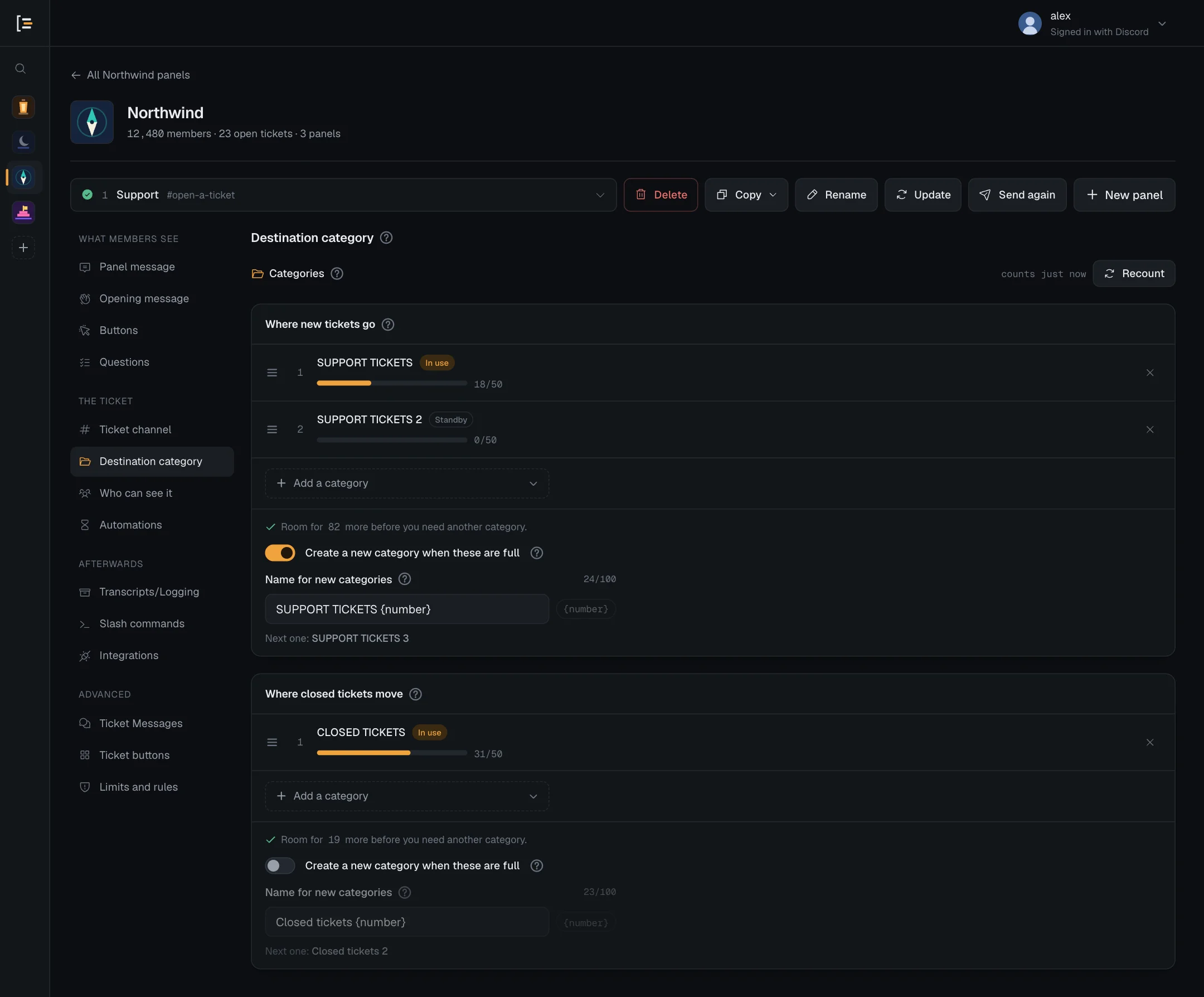
#Where new tickets go
This is an ordered list. Every new ticket goes into the highest category on the list that has room. The categories further down are overflow: Sortr only uses number 2 while number 1 is full, and the moment number 1 has room again, new tickets go back to it.
- Open the panel. In the dashboard, pick your server, then the panel.
- Go to Destination category. It is in the left menu under The ticket.
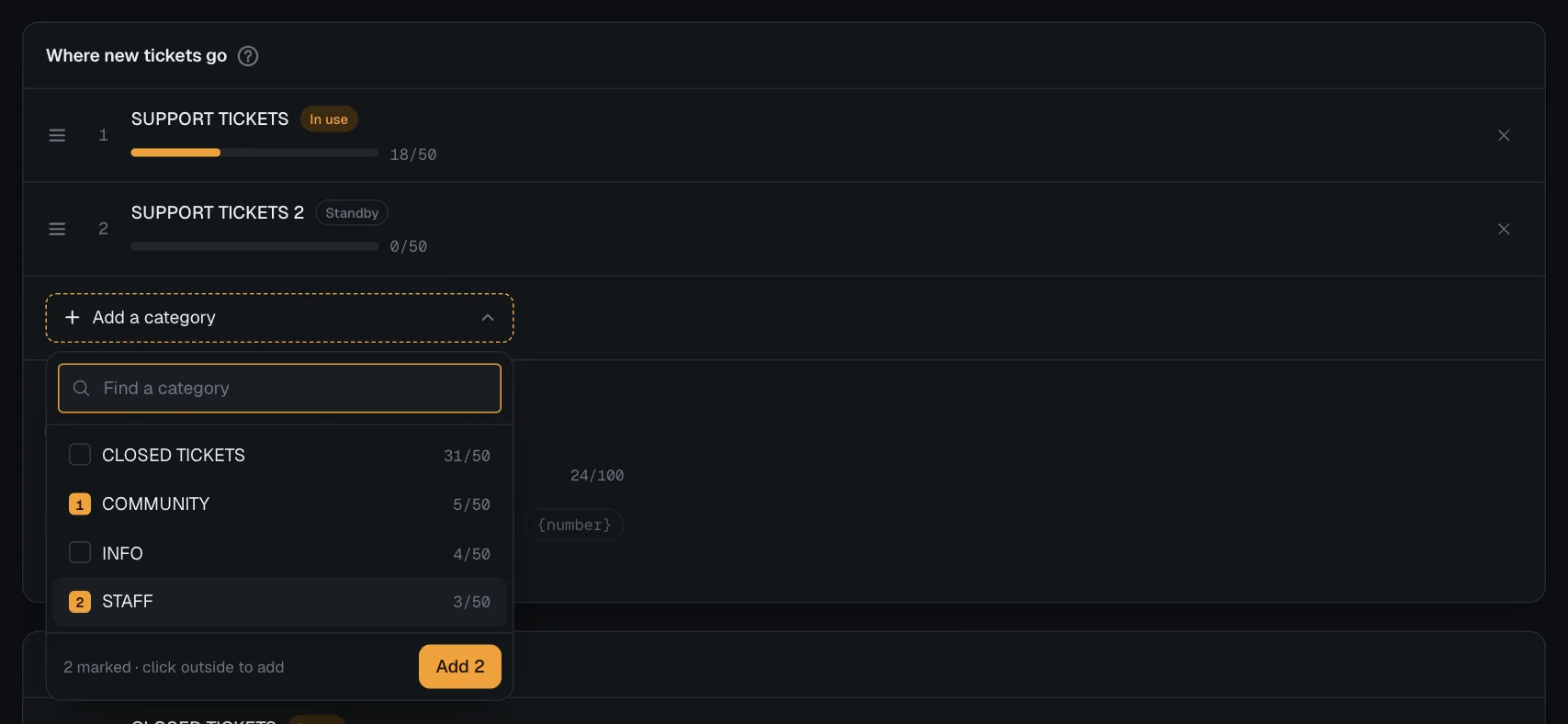
- Add categories. Under Where new tickets go, press Add a category. The list shows how full each category is, for example 12/50, and has a search box. Press each category you want, in the order you want them. Each one you mark shows its number, and pressing it again unmarks it.
- Close the list. Press Add 2 (the button counts what you marked), or click outside the list. The marked categories join the end of your list in the order you marked them.
- Put them in order. Drag a category by the handle at the left of its row. With a keyboard, focus the handle and press the up and down arrow keys to move it one place, or Home and End to move it to the top or the bottom. The × on the right takes a category off the list.
- Save. Press Save changes at the bottom of the page.
With no category on the list, the screen says No category selected and Sortr creates tickets at the top level of your channel list, outside any category.
A ticket channel does not take its permissions from the category it is in. Sortr writes the channel's permissions itself, from Who can see it, so a category can be private or public without changing who sees a ticket. A private category has to let Sortr's role in, with View Channel and Manage Channels in the category's own permissions, or no ticket opens there: see Reading the list.
#Why add a second category
Discord refuses a 51st channel in a category. With one category, a busy day or a pile of closed tickets that nobody deleted would leave Sortr with nowhere to put the next ticket. A second category gives tickets somewhere to go while the first is full, and you do not have to change anything when the first empties again. Or let Sortr create the next category when it is needed.
Every channel in a category counts towards its 50, not only tickets.
#Reading the list
Each category on the list shows its position, a bar with how many of its 50 places are used, and a status:
| Status | What it means |
|---|---|
| In use | New tickets are being created here right now. |
| Standby | Has room, but is only used while every category above it is full. |
| Full | At Discord's 50-channel limit, and skipped until a channel is freed. |
| Missing | Deleted from the server, or still there but hidden from Sortr: a private category Sortr's role isn't let into. A deleted one is named Deleted category, reads "not found" in place of the count, and is skipped. A hidden one is named Hidden from Sortr and reads "can't see it": see below. |
When a category has 45 to 49 channels, it also shows how many places are left. Under the list, Sortr adds up the free places: Room for 61 more before you need another category. When there are none, it says Nowhere left to put a ticket. Add another category or free up channels., or, when the list creates categories, which one comes next: Every category is full, so the next ticket creates Tickets 3.
The counts come from Sortr when the screen opens. Press Recount at the top to fetch fresh numbers. It does not touch your unsaved changes.
For a missing category, a red line under the list says what to do: "1 category no longer exists in the server. Remove it or recreate it." for a deleted one, and "Sortr can't see 1 category on this list, so no ticket goes there. Let Sortr's role in with View channel and Manage channels, or remove it." for a hidden one. A hidden category is still in Discord, and Sortr still tries it in its place on the list. A new ticket that would go there does not open: the member is told "Sortr can't open tickets here right now. Let the server's staff know." and the log says Sortr cannot open tickets in that category. A closed ticket that would move there stays where it is, and the log says Could not move a ticket. The warning at the top of the server's page, "Sortr can't reach everything your panels use.", also names it, for example "Support opens tickets in a private category: Sortr needs View Channel, Manage Channels there." (or "moves closed tickets to a private category" for the closed list). A category Sortr can see but not create channels in is named there too, by its name. See Private categories.
#Where closed tickets move
When a ticket closes, Sortr renames it (see Ticket channel) and moves it to the highest category with room on the Where closed tickets move list. It is the same kind of ordered list, you add to it and reorder it the same way, and it follows the same fall-back rule. Moving a ticket does not change its permissions.
- With no category on this list, closed tickets stay where they are, mixed in with open ones.
- If every category on this list is full, the ticket stays where it is, unless the list creates categories.
- When a ticket is reopened, Sortr moves it back to the highest category with room on Where new tickets go. If there is none, it stays where it is. Reopening never creates a category.
The same category can be on both lists.
Tip. Closed tickets keep their channel until someone deletes it, so they fill categories quietly. Switch on Automatic delete under Automations, or cap them with the closed-ticket limits under Limits and rules.
#Create a new category when these are full
Each list has its own switch, Create a new category when these are full, under its categories. It appears once the list has at least one category, and it is off to begin with. With it on, when every category on that list is full, Sortr creates the next one, adds it to the end of the list and puts the ticket there (or moves the closed ticket there).
- Switch it on. Under the list you want, switch on Create a new category when these are full.
- Name the new categories. Name for new categories starts as
Tickets {number}for new tickets andClosed tickets {number}for closed ones. Change it if you like, up to 100 characters. - Check the next name. The line under the field shows what the next category would be called, such as "Next one: Tickets 3".
- Save. Press Save changes.
{number} becomes the new category's place in the list. With two categories on the list, the next one is number 3. A name can hold {number} only once. The {number} button beside the field adds it to the end of the name, and is greyed out once the name has it, or when the name is too long to take it: names stop at 100 characters. A name with {number} typed twice shows "Use {number} only once in the name." under the field.
#What the new category copies
The new category gets the permissions of the last category on the list that is still in the server, and Sortr gives itself View Channel and Manage Channels on it. Discord only lets Sortr copy a permission its own role holds in the server, and never Manage Permissions unless its role has Administrator, so anything else is left out and the log entry names it.
Every category Sortr creates posts Category created in your log channel. The event is on by default, under Transcripts/Logging › Event log.
#When Sortr does not create one
Sortr holds back so a busy list can never run away with your server's channels:
- 10 categories per name. Sortr stops once 10 categories in the server have a name made from your pattern, whatever number they carry. Categories you took off the list, or made yourself with such a name, count too. The card then says "10 categories in this server already have a name like this, so Sortr will not create another. Remove some or change the name."
- 470 channels. It creates none once the server has 470 channels. Threads do not count. See When the server is nearly out of channels.
- Manage Channels. Sortr needs this permission in the server. It is on the invite, so it is missing only when it was unticked on Discord's screen, or taken off Sortr's role since.
- Something to copy. At least one category on the list must still be in the server.
Save changes is blocked while a switched-on list has an empty name, a name longer than 100 characters, or {number} more than once. The save bar shows it under Destination category, for example "Where new tickets go: a new category needs a name. Type one, or switch creating categories off." or "Where closed tickets move: the new category's name can hold {number} only once. Remove the others."
For the closed list, the close itself never waits: the ticket closes, and the channel moves once the new category exists. If the ticket was reopened in the meantime, it is not moved.
#If you have the panel open when Sortr adds a category
Adding a category changes the panel's saved list. If you had that panel open in the editor at the time, your next save says "Someone else saved this panel after you opened it. Keep your changes to replace theirs, or load their version and lose yours."
- Keep my changes saves your edits and keeps the new category: it goes on the end of the same list, where Sortr put it, and shows on the screen straight away. A note in the corner says "A category was added to Destination category while you were editing, so your save kept it." A category you took off the list yourself stays off.
- Load their version loads the saved panel, with the new category, and drops your unsaved edits.
#When every category is full
What happens when every category on a list is full or missing depends on that list's Create a new category when these are full switch:
| Switch off (the default) | Switch on | |
|---|---|---|
| Where new tickets go | The ticket still opens, but without a category, at the top level of your channel list. The log says so. | Sortr creates the next category and opens the ticket in it. If it cannot create one, the ticket opens without a category and the log says why. |
| Where closed tickets move | The closed ticket is renamed and stays where it is. Nothing is logged. | Sortr creates the next category and moves the ticket there. If it cannot create one, the ticket stays where it is and the log says why. |
The log entry for a new ticket looks like this:
This is the Category full event, which is on by default. It only reaches you if the panel has a log channel, set under Transcripts/Logging › Event log. See Event log. A closed ticket gets an entry only when Where closed tickets move creates categories and none could be made. It is titled Every closed-ticket category is full and says the ticket stays where it is.
When the list creates categories and none could be made, the entry adds a line starting "No new category was created:" with the reason, such as:
- Sortr needs the Manage Channels permission to create one
- the server is close to Discord's limit of 500 channels
- 10 categories already have a name made from this pattern, which is as many as Sortr creates
- none of the categories in the list is still in the server, so there are no permissions to copy
- Discord refused to create it, with Discord's own error
If every category on the list was deleted, the entry is titled No category to put the ticket in instead, and asks you to pick a category on the panel.
If Discord says a category is full a moment before Sortr's own count does, Sortr tries the next category on the list instead.
A category Sortr cannot see, or can see but is not allowed to create channels in, is different: the ticket does not open at all, and the log says Sortr cannot open tickets in that category. See Reading the list and Private categories.
#When the server is nearly out of channels
Discord allows 500 channels in a server, categories included. Sortr stops opening new tickets once the server has 470 channels, so a flood of tickets can never leave you without room to make a channel of your own. Threads do not count towards the 470. This applies to every panel, and no role bypasses it.
A member who presses the button then gets a reply only they can see: "Tickets cannot be opened right now because this server is almost out of channels. Please let a moderator know." This message is built in and cannot be edited. Your log channel gets a Server is almost out of channels entry, with how many channels the server has and what to do about it. That event is always on, and posts at most once an hour. Each member turned away also gets an Open refused entry, saying they could not open one because the server is close to Discord's 500-channel limit. That one belongs to the Ticket limit reached event, which is off by default, so switch it on under Transcripts/Logging › Event log if you want to see who was refused.
If Discord itself refuses because the server is at 500, the member is told "This server is at Discord's limit of 500 channels, so no ticket can be opened right now. Let the server's staff know." and the log gets a Could not create a ticket channel entry.
To make room, delete closed tickets you no longer need, or channels and categories the server no longer uses.