DocsPanels
Copy panels between servers
Copy a panel to other servers you manage, or bring one in from another server, with roles, channels and categories matched by name.
Set a panel up once and copy it to every server you run, or bring one in from another server. Sortr matches roles, channels and categories by name, and copying again later brings the copies up to date.
Dashboard › your server › a panel › Copy › Copy to other servers
#Before you copy
You need to be the owner or have the Administrator permission in both servers, and Sortr has to be in both. Only servers that meet both are offered. Servers you manage that do not have Sortr yet are folded away under a line such as "2 other servers do not have Sortr yet"; add Sortr there first. In a server that requires 2FA for moderator actions, you also need 2FA on your Discord account: without it, Copy from another server leaves that server out, and Copy to other servers names it with the reason and skips it (see Servers that require 2FA).
A copy takes the panel's saved settings, messages and questions, its name, and its images: each uploaded image is copied into the other server, so the copy keeps its pictures whatever happens to the original. The copied images count towards your own 300 MB of image storage, or 40 MB if your Discord account was made less than 30 days ago. One that would go over a limit is left out of the copy, so upload it again in the copy if that happens. It also takes every panel its options open, and the panels those open in turn, so a menu that leads to Billing and Reports still works in the other server. Within one server, use Copy › Duplicate in this server instead.
#Copy to other servers
- Open the panel. Press Copy on the panel row, beside the panel picker, then Copy to other servers. Any unsaved changes are saved first.
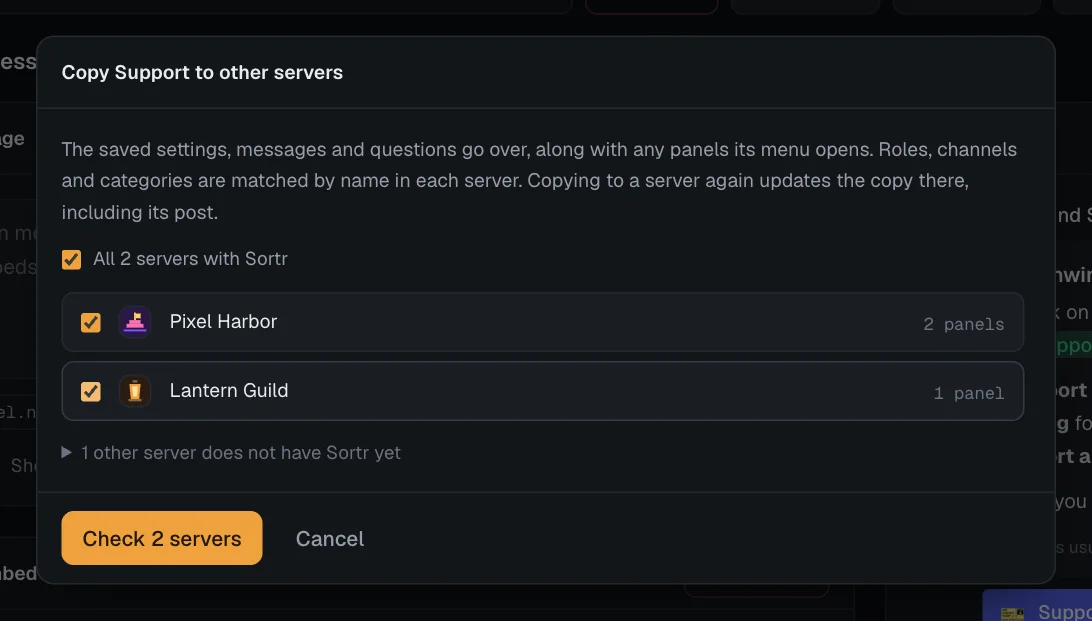
- Pick the servers. Tick each one, or tick the box that reads "All" and the number of your servers with Sortr to pick them all. A search box appears when there are more than six.
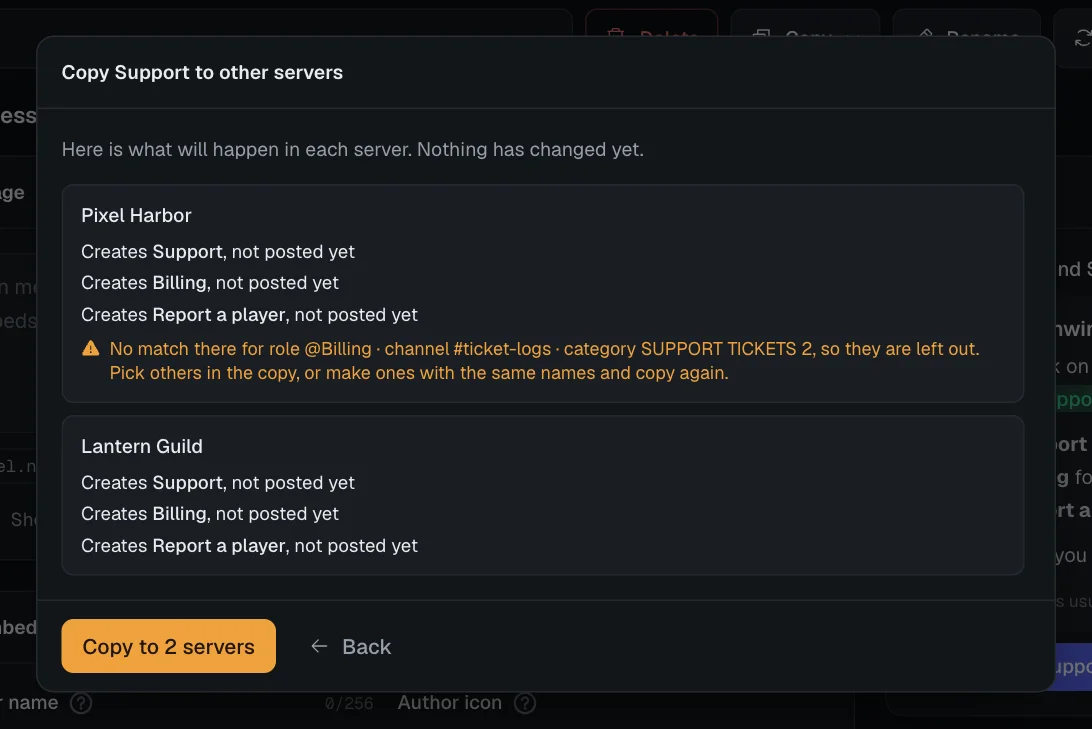
- Check. Press Check, or Check 3 servers with several picked. Nothing changes yet. For each server Sortr shows what it would do, such as "Creates Support, not posted yet" or "Updates Support, the earlier copy, and its post", and anything that has no match there.
- Copy. Press Copy to and the server's name, or Copy to 3 servers. Each result has an Open link that opens the copy in a new tab.
A server that cannot take the copy is named with the reason and skipped, and the rest go ahead. The usual reasons are that the server would go over 25 panels, that you do not manage it, that it requires 2FA for moderators and your account has none, or that the copy would break something a save would also refuse. When a server cannot take the copy covers the ones to do with roles.
#Copy in from another server
- Open the server you want the panel in. On its page, press Copy from another server, next to New panel.
- Pick a panel. Your other servers with Sortr are listed with their panels, each marked Posted or Not posted. Pick one and press Next.
- Read the plan. It says whether the panel will be created or will update an earlier copy, and what has no match in this server.
- Copy. Press Copy into and this server's name, or Pick another to go back.
The copy opens straight away. If something had no match, the line under the panel row reminds you: "Some roles or channels had no match here, so check Who can see it and Destination category before sending it."
#How roles, channels and categories are matched
Roles, channels and categories belong to one server, so Sortr looks each one up in the other server by name. An exact match comes first, then one that differs only in capitals, so a role called support finds Support. Channels only match channels, and categories only match categories. This covers:
- support roles, with their permissions, and the roles in When a ticket opens and When it closes;
- the roles in each option's Access and roles on Buttons: the ones under Who can use it, Give roles and Remove roles;
- the roles picked under Who can use it for each slash command;
- the Allowed roles and Blocked roles on Ticket buttons;
- roles that skip limits, blocked roles, and the roles a quiet ticket reminder pings;
- the categories for new and closed tickets, the log channel and the transcript channel;
- role and channel mentions typed into any message.
Settings that do not point at anything in the server copy as they are. That includes the Create a new category when these are full switches and their Name for new categories, so new categories in the copy are named the same way. See Destination category.
Anything without a match is left out, never guessed, and the check names it, for example "No match there for role @Moderators · category Tickets, so they are left out." Pick others in the copy afterwards, or create ones with the same names in that server and copy again. A mention with no match turns into plain text, such as @Moderators or #rules, rather than showing as a deleted role or channel.
If an option on the panel opens a panel that no longer exists, it is left out of the copy's buttons or menu, and the check says so under "Left out of the menu".
#When a server cannot take the copy
A copy gets the same checks as a save, made in the server it lands in. So what a role with no match does to the copy depends on the setting it was in:
- An option set to Only these roles needs at least one of its roles to exist there. With none, the option would be open to nobody but admins, so the copy into that server is refused. The check shows the panel's name and the option, for example: "Support: Buttons · Option "Staff application": Pick a role for Only these roles, or choose Everyone. As it is, only admins could use it." Create a role with the same name in that server and check again.
- An option set to Everyone except these roles copies without its missing roles. If none of them has a match, everyone can use the option in the copy.
- A slash command whose picked roles all have no match goes back to the support team only in the copy.
- Roles the copy would have Sortr give or take away are held to the same rules as in a save, in the server the copy lands in. That includes letting more members reach a role at or above your own highest role there, which only that server's owner can do. Who can pick which roles lists the rules.
#What is never copied
Two settings stay behind: the Google Sheet link from Google Sheets and the webhooks under Integrations. Having one server's answers and events land in another server's sheet or app is rarely what anyone wants, and a webhook's signing secret belongs to one server. A new copy starts without them, and an updated copy keeps its own. Duplicate in this server copies everything, these included.
Tickets, transcripts and the log stay with the server they happened in.
#Copying again
Every copy remembers the panel it came from. Copying the same panel to the same server again updates the earlier copy instead of adding a second one, and copying a copy back to the server it came from updates the original. If the earlier copy has been deleted, a new one is made.
Careful. Updating replaces the earlier copy's settings and name with this panel's. Changes someone made to the copy in that server are overwritten, apart from its Google Sheet link and webhooks.
If someone saves that copy while you are copying, nothing changes in that server and you are told "Someone saved one of these panels in that server just now. Check it, then copy again." When an earlier copy is updated, the changes are written to that server's event log, and the copy's existing tickets follow: a support role the update removes loses access to them, and a changed role gets its new permissions on the tickets it is already on. Where Discord refuses Sortr in a ticket's channel, for example when its role lacks Manage Permissions there, the event log names the tickets that kept their old support roles. A support role the update adds is not let into tickets that already exist, only into tickets opened after the copy. The check says so for each copy that has tickets, for example "Its 12 tickets already there will not get @Moderators. Only tickets opened after the copy will." Who can see it says how a support role reaches existing tickets.
#Posted and unposted copies
A new copy arrives unposted, so nothing appears in the other server until someone sends it. See Posting a panel. A category or channel matched there that is private needs Sortr's role let in, in that place's own permissions; the warning "Sortr can't reach everything your panels use." on that server's page names each one Sortr cannot use.
Updating a copy that is already posted also rewrites its post, since that is the point of copying the change over. If the post cannot be updated, for example because its channel is gone or Sortr can no longer post there, the result says "Its post was not updated" with the reason, and the settings are copied anyway.