DocsWhat members see
Questions
Ask members a few questions before their ticket opens, with a native Discord form.
Questions puts a short Discord form in front of the ticket. Members answer up to five questions before the channel is made, by typing or by attaching files, so your staff know what the ticket is about from the first message.
Dashboard › your server › a panel › Questions
#What members see
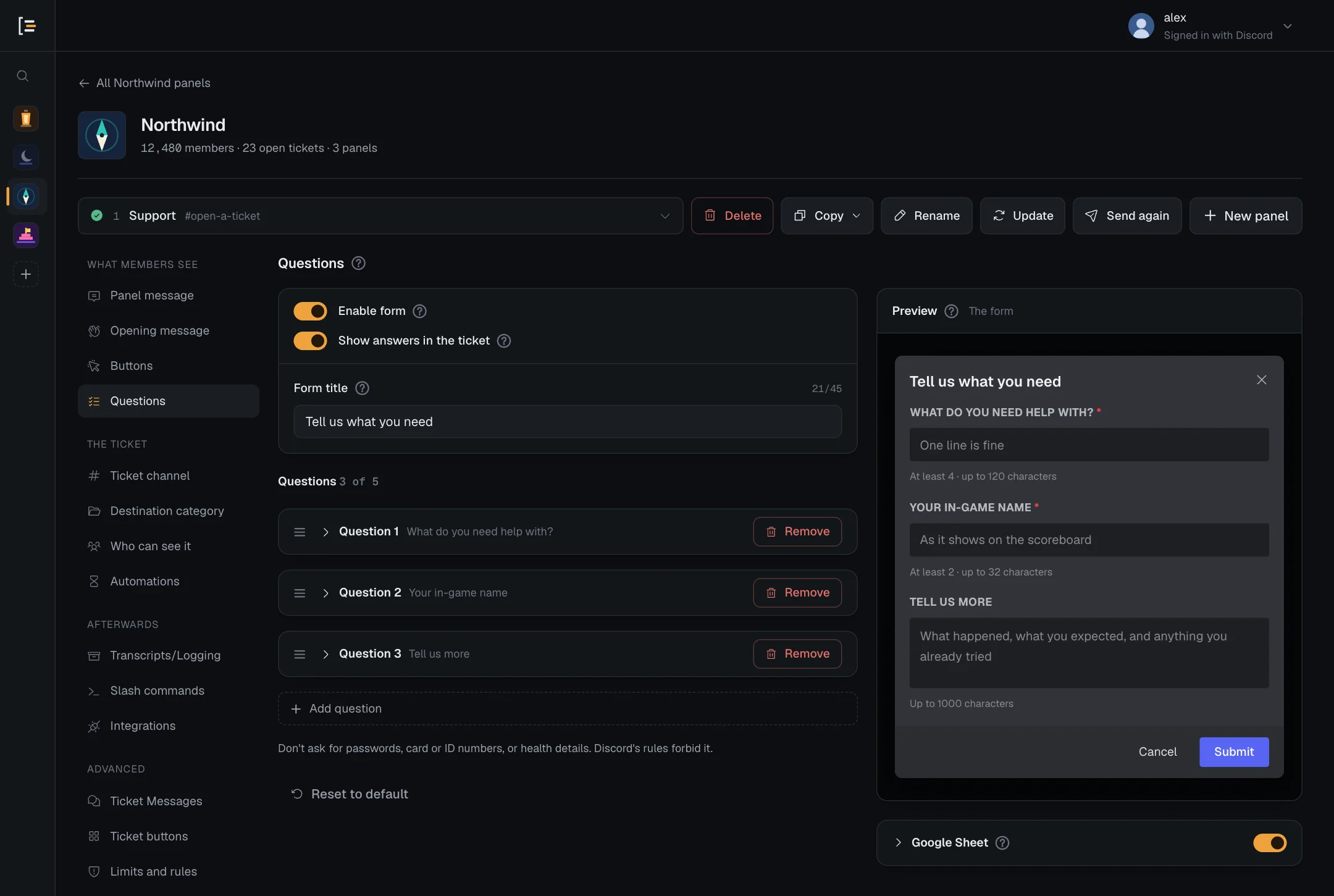
With the form on, pressing the button (or picking from the menu) opens a pop-up window in Discord straight away. It has your form title at the top, your questions below, and Submit and Cancel at the bottom. A question that takes files shows an upload box instead of a text box (see Questions that take files). The ticket is only created when they submit. If they close the window, nothing happens and nothing is stored.
Sortr checks the panel's rules twice: before the form opens, and again when it is submitted, since a form can sit open for a while. A member who may not use that option, has reached a limit, is outside support hours or holds a blocked role is told so instead of getting a ticket. See Limits and rules. If you switch the form off while a member has it open, sending it opens nothing, and they are told "This option no longer works. Let the staff know so they can fix it."
A ticket opened with the /new command skips the form, so it has no answers.
Good to know. The form comes from the panel the ticket opens with. If an option on this panel's Buttons screen opens another panel, members get that panel's questions, not this one's.
#Turn the form on
- Open the panel. In the dashboard, pick your server, then the panel.
- Go to Questions. It is in the left menu under What members see.
- Switch on Enable form. The title and questions below become editable.
- Set the Form title. It sits at the top of the window, up to 45 characters. A new panel starts with "Please answer these questions".
- Write your questions. A new panel has three examples. Press a question's header to unfold it and edit it, or press Add question under the last one.
- Save. Press Save changes. The form is used from the next button press. The panel post itself does not need updating.
If the switch refuses with "Too many embeds for the form", see The form and the opening message.
#Questions
A form holds up to 5 questions, which is Discord's limit. The counter beside Questions shows how many you have, such as "3 of 5". Each question is either a text box that members type into or, with Answer set to Files, a box to attach files in.
Each question is a card, and the cards start folded so all five fit on the screen. A folded card shows "Question 1" and the question's title. Press anywhere on its header to unfold it, and again to fold it. A question you add with Add question opens unfolded, with its title box ready to type in.
| Setting | What it does | Default for a new question |
|---|---|---|
| Question title | The question itself, shown above the answer box. Up to 45 characters. | Empty |
| Answer | Text for a box they type in, or Files to let them attach files. The settings below are for text; a file question has its own, see Questions that take files. | Text |
| Question placeholder | Grey example text inside the box, gone once they start typing. Up to 100 characters. | Empty |
| Min length | The fewest characters Discord accepts, from 0 to 4,000. Blank or 0 means any length. | 0 |
| Max length | The most characters Discord accepts, from 1 to 4,000. Leave blank for any length, which is up to 4,000. | Blank (any) |
| Required | Discord will not let them submit until this one is answered. | On |
| Multi-line | A tall box for longer answers. Off gives a single line. | Off |
- Add question is the dashed button under the last question. At five questions it reads "Discord allows 5 questions per form" and cannot be pressed. Under it, a line says "Don't ask for passwords, card or ID numbers, or health details. Discord's rules forbid it." See What a form can't ask.
- Drag a question by the handle at the left of its header to change the order, or focus the handle and use the arrow keys. Remove deletes it. Order matters for answer variables.
- An optional question can have a minimum length. Discord applies it only when the member types something.
- While the form is off, the questions are dimmed and locked. You can still unfold one to read it.
#What the screen checks
While the form is on, Save changes is blocked when:
- the Form title is blank;
- the form has no questions;
- a Max length is outside 1 to 4,000;
- a Min length is longer than its Max length;
- a question, or the Form title, asks for a password or a login code (see below).
The save bar names the problem under Questions, for example "The form is on but has no title. Type one, or switch the form off." Fix it, or switch the form off.
The screen also flags a question with no title ("Every question needs a title."). That one does not block the save, but give it a title: a blank one reaches members as a stand-in such as "Question 2". A folded card with a problem shows a red warning sign in its header.
#What a form can't ask
Discord's rules forbid an app asking members for their login, so Sortr refuses a form that does. While the form is on, a question whose title or placeholder asks for a password or passcode, a 2FA, backup, recovery or login code, a card's security code (CVV), a seed or recovery phrase, a private or recovery key, or a Discord, bot, API or login token blocks the save. So does a Form title that asks for one. The question's card, or the space above the questions for the title, says "Sortr can't ask for passwords, login codes or recovery phrases. Discord's rules forbid it." The same answer comes back however the panel is saved, copied or imported.
Ordinary questions pass: an order number, a discount or gift card code, or a plain "token", such as which one a member bought. So does a question that only mentions a password, such as "Forgot your password? Your email". A panel saved before this check keeps working, but its next save is refused until the question changes.
Don't ask for card or bank details, government ID numbers or health information either, nor for photos of documents that show them. Sortr doesn't check for these, but Discord's rules and Sortr's Terms forbid collecting them. See Privacy and data.
#Questions that take files
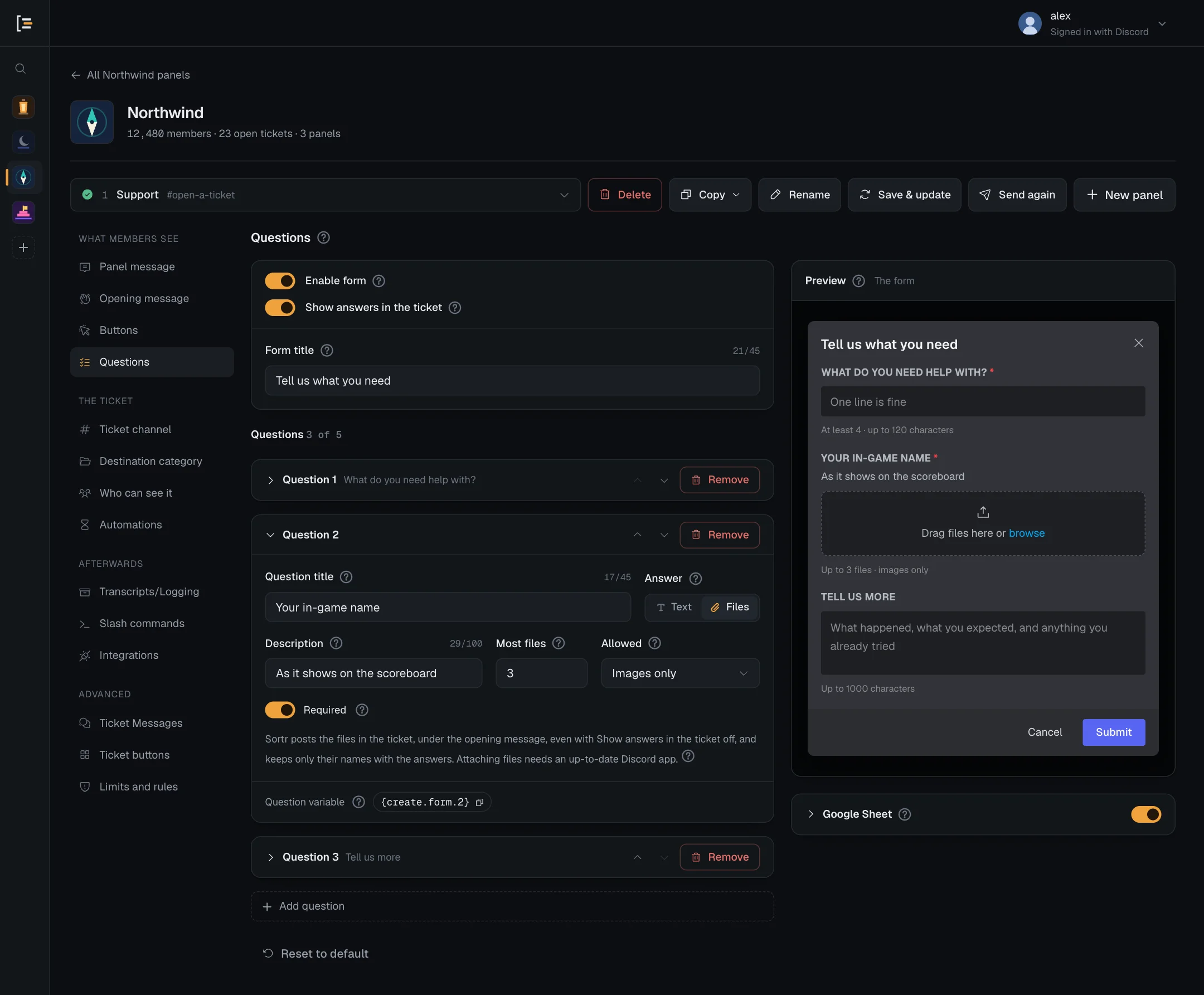
A question can ask for screenshots, a video or a document instead of typed text. Unfold the question and set Answer to Files. Its title and Required stay, and the text settings make way for these:
| Setting | What it does | Default |
|---|---|---|
| Description | A line Discord shows under the question, saying what to attach. Up to 100 characters. A question that was text keeps its placeholder here. | Empty |
| Most files | How many files they may attach to this question, from 1 to 10. | 3 |
| Allowed | Images only, Images and videos or Any file. Discord only offers files of this kind in the picker. Whatever is picked, Sortr never copies programs, scripts, archives and a few other kinds of file (see below). | Images only |
| Required | Discord will not let them submit the form until at least one file is attached. Off, they may send it with none. | On |
Switching back to Text keeps the file settings, unused, so nothing is lost if you change your mind. A form can mix text and file questions, up to 5 in all.
Members drag files into the box or browse for them on their device. Attaching files needs an up-to-date Discord app.
#The files in the ticket
Once the ticket is open, Sortr posts a copy of the files in the ticket channel, under the opening message: one message per file question, headed with the question and "from" and the member, such as "Your screenshots · from @ren.oakley". The mention does not ping. The files are posted even with Show answers in the ticket off. One message carries up to 10 files and no more than Sortr may upload in the server, so large files can go on in a second message marked "(continued)".
In the answers embed, a file question reads "2 files attached", followed by the files' names as plain text, or "No files" when nothing was attached. A long list of names is shortened to fit.
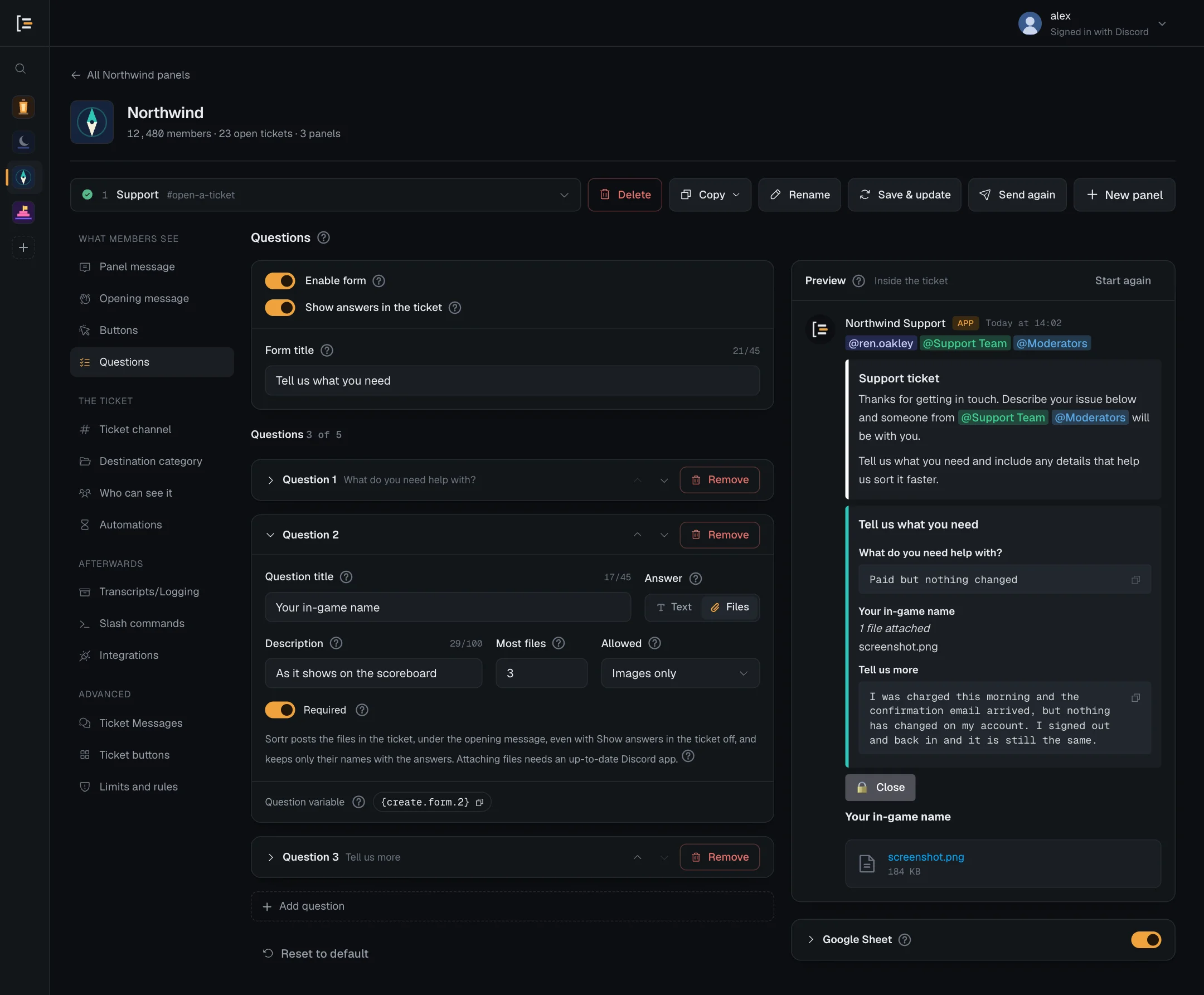
As the screen says: "Sortr posts the files in the ticket, under the opening message, even with Show answers in the ticket off, and keeps only their names with the answers." The copy in the ticket is the only one: Sortr does not store the files, only their names. The files stay as long as their messages do, and go when the ticket channel is deleted. A transcript shows them like any file in the ticket: as links to Discord's copies, with pictures shown, and those links can stop working after a while.
Sortr tidies each file's name before posting and keeping it: anything other than plain letters, digits, spaces, full stops, dashes, underscores and brackets becomes an underscore, and a name stops at 100 characters.
#Files Sortr does not copy
A file Sortr cannot copy is named instead, in a message under the question's heading: "Not copied. @ren.oakley can post them in this channel.", then one line per file with the reason. The member can then post it in the ticket themselves.
| After the file's name | Why |
|---|---|
| (31 MB, over the 20 MB Sortr can post here) | The file is bigger than Sortr may upload in the server: 20 MB, or 25 MB in a server with Server Boost level 2 or 3. Sortr never copies a file over 25 MB. |
| (not an image) (not an image or a video) | The question takes Images only or Images and videos, and the file is not one. Images are PNG, JPEG, GIF and WebP, videos MP4, MOV and WebM, and both the file's type and the end of its name have to match. |
| (programs, archives and files that can run code aren't copied) | Whatever the question allows, Sortr never copies a program, script, installer or archive, such as an .exe, .bat, .ps1, .apk, .dmg, .zip, .rar or .7z file, judged by the end of its name and by the type Discord reports. It never copies web pages (such as .html), SVG images, Office files with macros (such as .docm, .xlsm and .pptm), OneNote files, .chm help files, or Windows shortcut and setup files such as .url, .scf and .inf either, and names them with the same reason. |
| (a file without a type isn't copied) | The file's name has no extension, such as .png or .pdf, at its end. |
| (Discord did not hand it over) | Discord did not give Sortr the file, or not in time. |
| (more than Sortr copies from one form) | Sortr copies up to 100 MB of one form's files, across all its file questions, and stops copying them after 3 minutes. A file that would take the copies past 100 MB, or whose turn comes after the 3 minutes, is named instead. |
| (Sortr could not post it here) | Discord refused the message with the file, or Sortr was busy sending other files and could not post it in time. |
When many tickets across Sortr, or 3 from your server, are already waiting for their files to be copied, a new ticket's files are named without being copied, under "Sortr was too busy to copy these. @ren.oakley can post them in this channel."
The people who run Sortr can also stop file copying in every server at once, for example while dealing with abuse. Each file is then named under "Sortr isn't copying attached files right now. @ren.oakley can post them in this channel."
Posting files needs Attach Files. If Sortr's role lacks it in the ticket, the event log says "Sortr could not post the files attached to a form" under Missing Discord permission: "Give Sortr's role Attach Files in Server Settings, Roles (or press Re-add Sortr in the dashboard), so the files members attach reach the ticket."
#Where the answers go
With Show answers in the ticket on (the default), the answers are added to the opening message as one extra embed. Its title is your form title, its colour is set under Opening message, and each question is a field with the answer in a code block, so staff can copy an order number with Discord's copy button. An optional question left blank reads "No answer". A file question reads "2 files attached" with the names, or "No files", and its files are posted under the opening message (see The files in the ticket).
The answers share room with your opening message, since Discord caps one message's embeds at 6,000 characters. An answer that does not fit is shortened in the channel, and none is shown longer than 1,000 characters. The full answer is always kept.
With Show answers in the ticket off, the answers are not posted in the channel, though the files of a file question still are. Either way, Sortr:
- stores every answer in full, encrypted, with the ticket. For a file question that is the files' names, separated by commas, never the files;
- uses the start of the first answer as the ticket's subject in the closed tickets list;
- sends the answers to your Google Sheet and webhooks if you use them. A blank answer is sent as an empty value. The sheet gets a file question's file names; webhooks get the names, sizes and types.
So members know, Sortr then adds a small line at the end of the opening message: "Your answers are also sent to this server's own tools (a Google Sheet)." It says "(a webhook)" or "(a Google Sheet and a webhook)" instead when those are what the panel uses. It appears when the member answered the form and the panel's Google Sheet export is switched on and set up, or one of its webhooks sends Ticket opened. You can't switch it off or change its words.
Sortr deletes a closed ticket's stored answers and its subject once the panel's Keep it for period has passed since the close, or a year after the close with Until deleted by hand. What was posted in the channel stays. See Transcripts.
Answers are shown exactly as typed. A mention such as @everyone or a role shows as text and never pings, and a link written as [text](address) shows as typed instead of becoming a link.
#Put answers into the opening message
Each question has a Question variable at the bottom of its card: {create.form.1} for the first question, {create.form.2} for the second, and so on up to {create.form.5}. Press it to copy it, then paste it into the Opening message, for example in the title:
Order {create.form.1}- The number follows the order on screen, so moving a question moves its variable. Check the opening message after reordering.
- An optional question left blank prints "No answer".
- A file question prints the files' names, separated by commas, and "No answer" when nothing was attached.
- These variables only work in the opening message. Anywhere else they are removed.
#The form and the opening message
While the form is on and Show answers in the ticket is on, the opening message can hold up to 4 embeds instead of 10, to leave room for the answers. With Show answers in the ticket off, nothing is added to the opening message, so it keeps the usual 10. Three things follow:
- If the opening message already has more than 4 embeds, Enable form will not switch on while Show answers in the ticket is on. A notice titled "Too many embeds for the form" says how many to remove. Remove them under Opening message first.
- In the same way, while the form is on, Show answers in the ticket will not switch on over 4 embeds. Its notice is titled "Too many embeds for the answers".
- While both are on, Add embed on the opening message stops at 4 and says why.
#Try it in the preview
The Preview card walks through what a member goes through. The small label beside its title says where you are: The form, Form closed or Inside the ticket.
- The form. The preview starts here. It shows the window Discord opens, with your form title, a red star beside each required question, and each box showing its placeholder, as a member sees it before typing. A file question shows its Description under the title and an upload box reading "Drag files here or browse".
- Press Submit. The preview moves to Inside the ticket: the opening message with the Close button. When Show answers in the ticket is on, the answers embed is under it, filled with sample answers. Each file question's sample files follow under the Close button.
- Or press Cancel. Cancel, or the X in the corner of the window, shows Form closed: "They closed the form, so no ticket was opened."
- Press Start again. It goes back to the form.
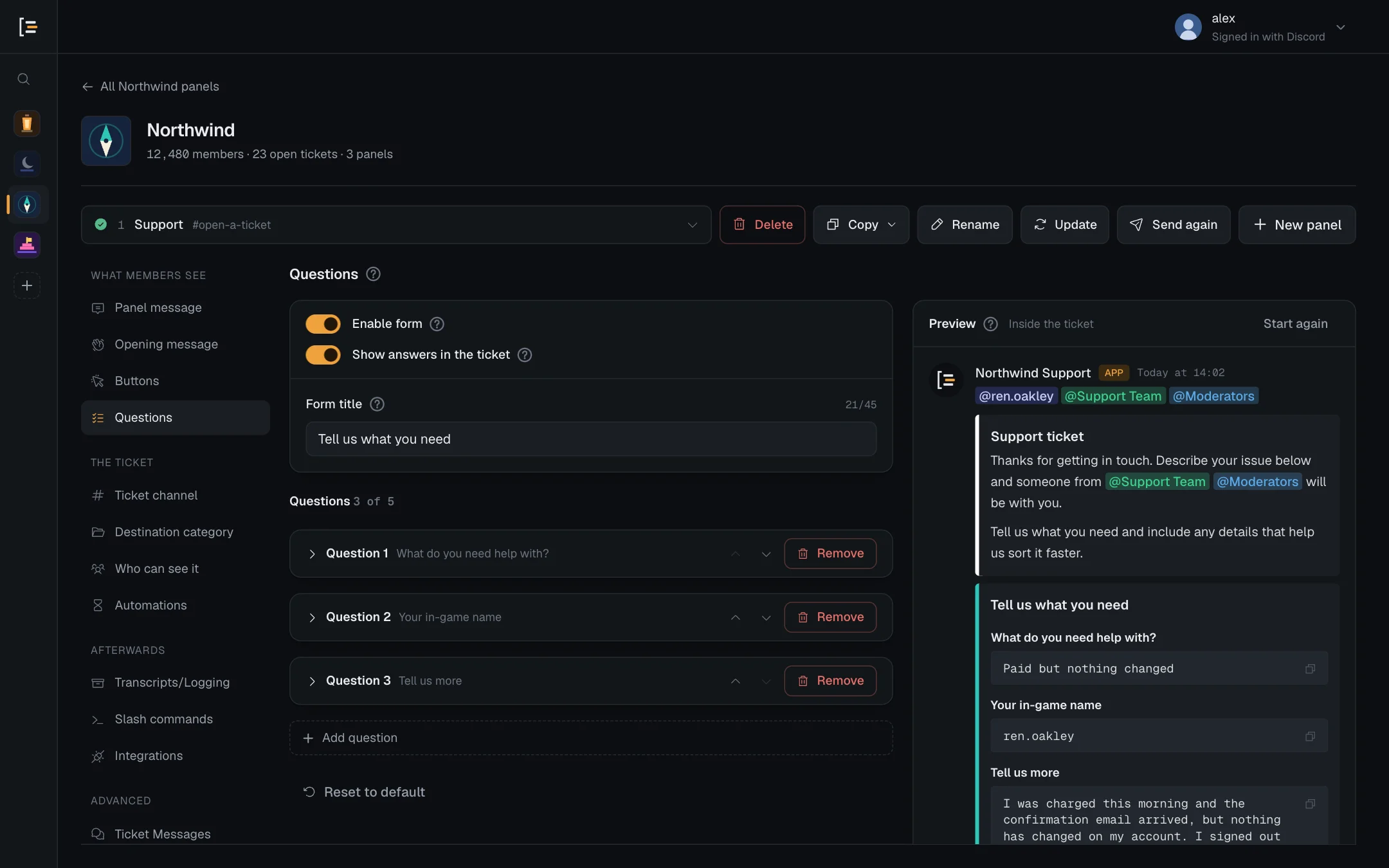
- With the form off, the preview shows the ticket directly, with no answers, because pressing the button opens the ticket straight away.
- Where you set a minimum or maximum, a line under the box says so, such as "Up to 200 characters". That line is only in the preview. Discord does not show it. Under a file question the line gives Most files, and the kind unless it is Any file, such as "Up to 3 files · images only".
- A blank form title shows as "Before we start" and a question with no title as "Question 2", which is what Sortr would send in their place.
#Copy answers to a Google Sheet
Under the preview is the Google Sheet card. It starts folded, unless something on it needs fixing: press its name to open it. Switch it on to copy every submitted form into a sheet you own, one row per ticket. The steps are on Google Sheets.
#Reset to default
Reset to default, under the questions, puts back the example form: the title "Please answer these questions" and three questions with no length limits. It also turns Show answers in the ticket back on and sets the Answers colour on Opening message back to White. The form stays switched on or off, as it was.
Careful. Reset makes new questions, so any Google Sheet columns you mapped to the old ones are cleared. Removing a single question clears its column too. Nothing is kept until you press Save changes, and Discard throws away every unsaved change.