DocsAfterwards
Closed tickets
Find any closed ticket by the member who opened it, read its transcript in the dashboard, and save or delete the copy kept on the Sortr site.
Closed tickets lists the tickets your server has closed, newest first, with the transcript wherever one was kept. Use it to look up a member's past tickets, read what was said, and save or delete the copy kept on the Sortr site.
Dashboard › your server › a panel › Transcripts/Logging › Closed tickets
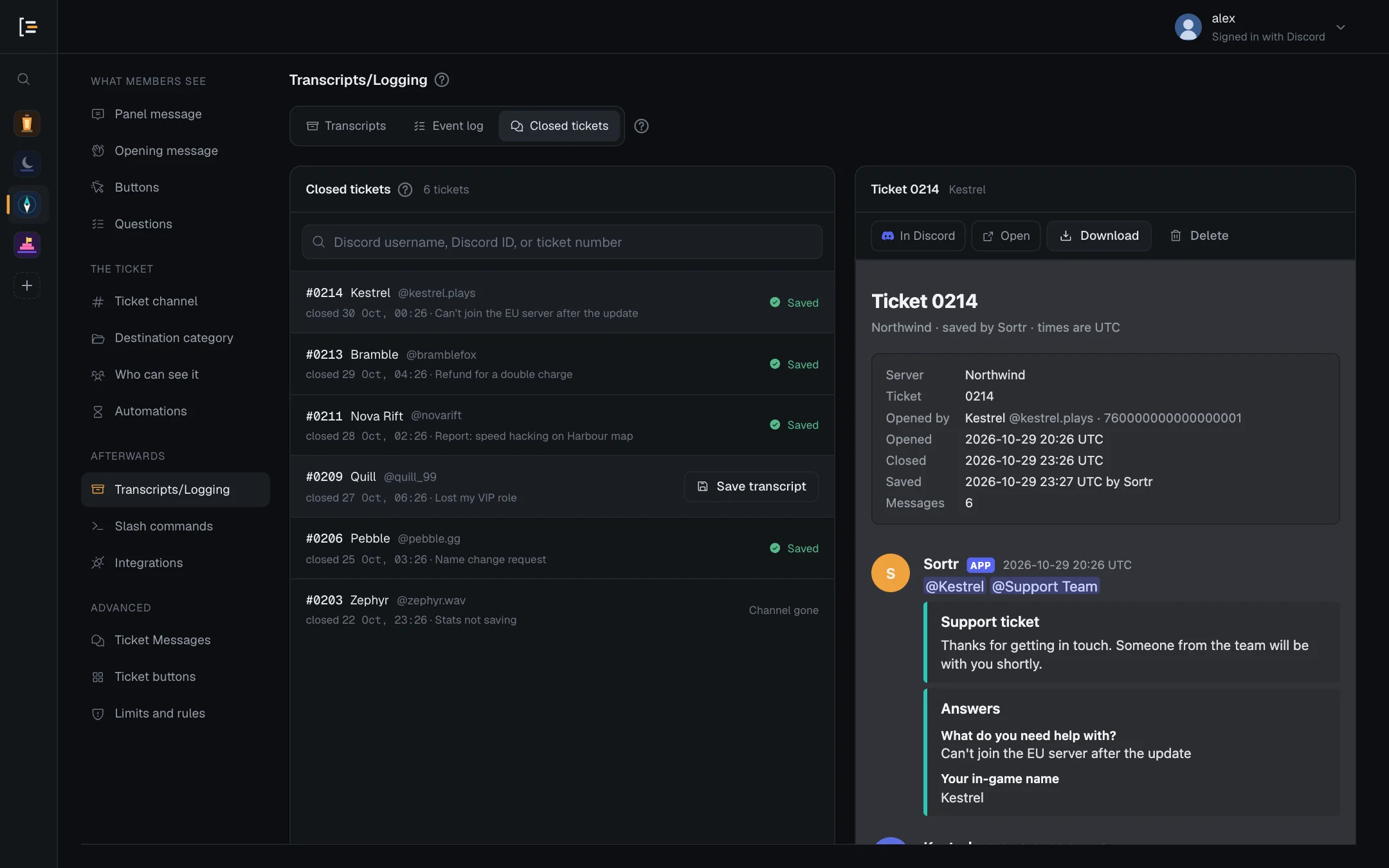
It sits under a panel's Transcripts/Logging, but the list covers every panel in the server. Like the rest of the dashboard, only the server owner and members with the Administrator permission can open it.
#What the list shows
Each row shows the ticket number, who opened it and when it closed. If the panel asked Questions, the start of the first answer is shown too. When the first question takes files, that is the names of the files attached. Members are shown by display name and username. If Sortr no longer knows their name, the row shows their Discord ID and "Former member". Deleted tickets are listed too.
A ticket deleted while it was still open never closed, so its row reads "deleted while open" with the date it was deleted, and it takes its place in the list by that date.
Numbers are written with the Digits setting of the ticket's panel as it is now, so after a change to Digits an older ticket shows the new number of digits here too.
The list shows the latest 300 closed tickets. When your server has more, the line above the list reads "Showing the latest 300". The search reaches the older ones.
On the right of each row:
| You see | What it means |
|---|---|
| Saved | A copy is kept on the Sortr site. Click the row to read it. |
| Save transcript | No site copy was kept, but the channel still exists, so you can save one now. |
| Channel gone | No site copy was kept and the channel has been deleted. The conversation cannot be read or saved here. |
Saved refers to the site copy only. A ticket whose transcript went only to a Discord channel shows Save transcript or Channel gone, and its file is still on that Discord post. See Transcripts for where copies go.
#Find a member's tickets
Type in the search box above the list. The search looks through every closed ticket in the server, not only the 300 on screen. It takes:
- A username or display name, with or without the @. Part of a name is enough.
- A Discord ID, 17 to 20 digits. This matches exactly, and finds a member's tickets even after they change their name or leave. In Discord, right-click the member and choose Copy User ID (this needs Developer Mode, under Discord's Advanced settings).
- A ticket number, such as
42or0042. - Words from the first answer, when the panel asks questions. This one only looks among the latest 300 closed tickets, because answers are stored encrypted.
A name is matched against the name saved with a ticket's transcript and against the members Sortr knows in the server now. Saved names are stored encrypted, so Sortr decrypts them to search, and looks through the names on the server's newest 500 transcripts. If a name finds nothing, try the member's ID, which searches every ticket.
Because each search opens those names, searches are limited for each server, shared by everyone searching it: 10 in a row, then 30 a minute. Past that the list says "Too many name searches in this server just now. Try again in a moment." A search by Discord ID does not count towards this.
The line above the list says how many tickets match, or "Showing the latest 300" when more than 300 do. If nothing matches, Clear search brings the full list back.
#Read a transcript
Click a row with Saved. The transcript opens beside the list (below it on a narrow screen), laid out as it looks in the file. Above it:
| Button | What it does |
|---|---|
| In Discord | Opens the Discord message that carries the file. Only there when a Discord copy was posted. |
| Open | Opens the transcript's own page in a new tab: the same private link the member gets. |
| Download | Saves the transcript to your computer as an HTML file. |
| Delete | Deletes every copy of this ticket kept on the site, after asking. See below. |
Sortr opens two transcripts at a time across all servers. When it is busy, the pane says "Could not open this transcript. A lot of transcripts are being opened right now. Try again in a moment." Press Try again beside it. Clicking another row stops loading the one before, so only the transcript you picked last opens.
The site copy stops at the moment the ticket closed, so it leaves out anything staff wrote afterwards. Why, and where to find the full version.
Pictures and files in it are links to Discord's own copies, and those links can stop working after a while. That includes the files a member attached to a question that takes files, which Sortr posted in the ticket. See What a transcript holds.
Opening a transcript can be logged as Transcript opened in the event log, if you tick it.
#Save a transcript for a closed ticket
If no site copy was kept but the ticket's channel still exists, Sortr can read the channel now and save one.
- Find the ticket. Search for the member or the ticket number.
- Press Save transcript. It is on the right of the row.
- Wait for the answer. Sortr reads the whole channel and says, for example, "Saved ticket 0042, 184 messages." It adds "Posted to Discord too." when the transcript was also posted to a Discord channel. The transcript then opens beside the list.
Saving from here always keeps a copy on the site, even when Keep a copy here is off for the panel, unless a limit on site copies is reached or Sortr is low on storage (Transcripts). Then the answer starts "No copy of ticket 0042 was kept on the site:" and the event log says which. The transcript is also posted to Discord if Post it to Discord is on. It is never sent to the member from here, even with Send it to the ticket owner on.
Good to know. Each ticket can be saved from here once every ten minutes. When many transcripts are already waiting to be saved for your server, Sortr answers "Sortr is saving many transcripts for this server right now. Try again in a few minutes." If the save fails, the answer is "Could not save the transcript. Check that Sortr can read the channel, then try again." To read it, Sortr's role needs View Channel and Read Message History in the ticket's channel.
#Once the ticket is deleted
Once a channel is deleted, Save transcript is replaced by Channel gone. You do not have to save by hand first. Deleting a ticket through Sortr, with the Delete button or the automatic delete, saves a transcript right before the channel goes when the ticket has no copy since its last close, and every time when the panel's Save it is set to When the ticket is deleted. The Delete button asks once before it deletes, and its prompt says whether a transcript is saved first. When Sortr saves one.
That copy goes to the places the panel has switched on. The row reads Saved only if Keep a copy here is on. With it off, the row shows Channel gone, and the transcript is on the Discord post or in the member's DMs. A channel someone deletes by hand in Discord is never saved.
A ticket Sortr took over from Ticket Tool can read Saved even with Keep a copy here off. Its transcript is posted only in a channel nobody outside the ticket's own roles can read (Administrators, the server owner and bots aside); otherwise Sortr keeps it on the site instead. Tickets taken over from Ticket Tool.
#Delete a site copy
- Open the ticket. Click its row so the transcript shows.
- Press Delete. It is the last button above the transcript.
- Confirm. A dialog asks "Delete the site copy of ticket 0042?" and says "Only the copy kept here is deleted, and Sortr cannot bring it back." It adds "The copy posted in Discord stays where it is." or, when there is none, "No copy of it was posted in Discord, so this may be the only one." Press Delete site copy, or Keep it to leave it.
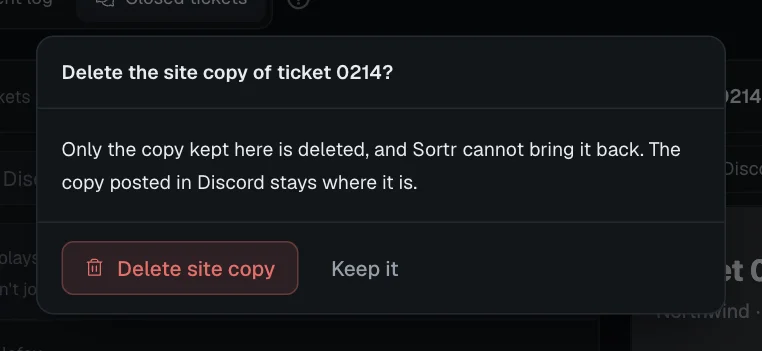
A ticket saved more than once has one site copy per save, keeping its first and its 3 newest (saving more removes the older ones in between), and the row shows the newest. Delete removes all of them at once, and the dialog names how many: "Delete the 3 site copies of ticket 0042?", "All 3 copies kept here are deleted, one for each time it was saved, and Sortr cannot bring them back." Its button then reads Delete site copies.
Only the copies on the Sortr site are deleted. The posts in your Discord channel and their files stay where they are. The transcript links stop working and show "No such transcript". The deletion is logged as Transcript deleted, which is on by default, with how many copies went. Once they are gone, the row offers Save transcript again if the ticket's channel still exists.
You do not have to delete copies yourself: site copies are removed on their own when their Keep it for time runs out. If Sortr is removed from your server, every site copy is deleted 30 days later, whatever Keep it for says, unless Sortr is added back before then.
Keep it for also sets when a closed ticket's subject and form answers are deleted, counted from the close. After that its row shows no subject, and words from the first answer no longer find it. A ticket whose channel is gone and that has no site copy left leaves the list a year after its close. See Transcripts.