DocsAfterwards
Transcripts
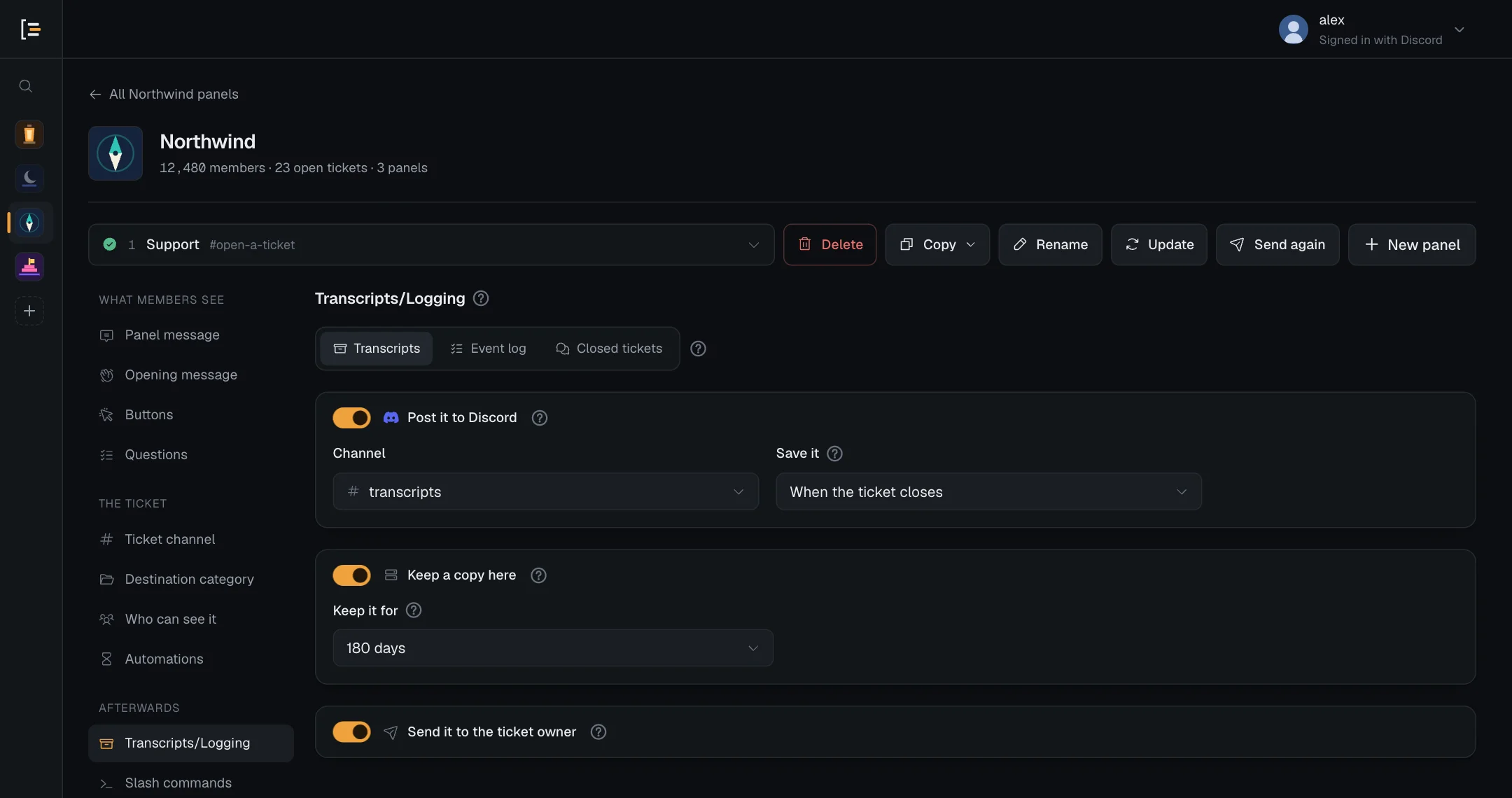
Keep a readable copy of every ticket's conversation in a Discord channel, on the Sortr site, in the member's DMs, or any mix of them, saved when the ticket closes or when it is deleted.
A transcript is a saved copy of a ticket's conversation that opens in any browser. You decide where it goes (a Discord channel, the Sortr site, the member's DMs, any mix of them, or nowhere at all) and when Sortr saves it: when the ticket closes, or when it is deleted.
Dashboard › your server › a panel › Transcripts/Logging › Transcripts
#What a transcript holds
Each transcript is one web page file (HTML) laid out like Discord. At the top it lists the server, the ticket number, who opened it (display name, username and Discord ID), when it opened and closed, when it was saved and by whom, and how many messages it holds. Below that comes every message in order, with names, times, formatting, embeds, attachments, stickers, polls and forwarded messages.
The Closed row shows the time the ticket closed. A transcript saved while the ticket is open shows "still open" there, and a ticket deleted while still open shows "not closed, deleted while open".
Times are in UTC. Images and files are links to Discord's own copies, and those links can stop working after a while.
The files a member attached to a question that takes files are in it too, once Sortr has posted its copy of them in the ticket under the opening message (see Questions). The transcript shows them like any other message with attachments, as links to Discord's copies, with pictures shown.
#When Sortr saves one
Save it, beside Channel on this screen, sets the moment. It has two choices, and the one choice covers all three places a transcript can go.
| Save it | What happens |
|---|---|
| When the ticket closes (the default) | Saved when the ticket closes, whether someone confirms Close, runs /close, or Automations closes a quiet ticket. Sortr locks the member out and posts the Ticket closed notice first, then saves, so the close does not wait for a long conversation to be read. A notice that uses {transcript.link} gets the link once the copy is saved, and the close message to the member and the Ticket closed webhook carry it. |
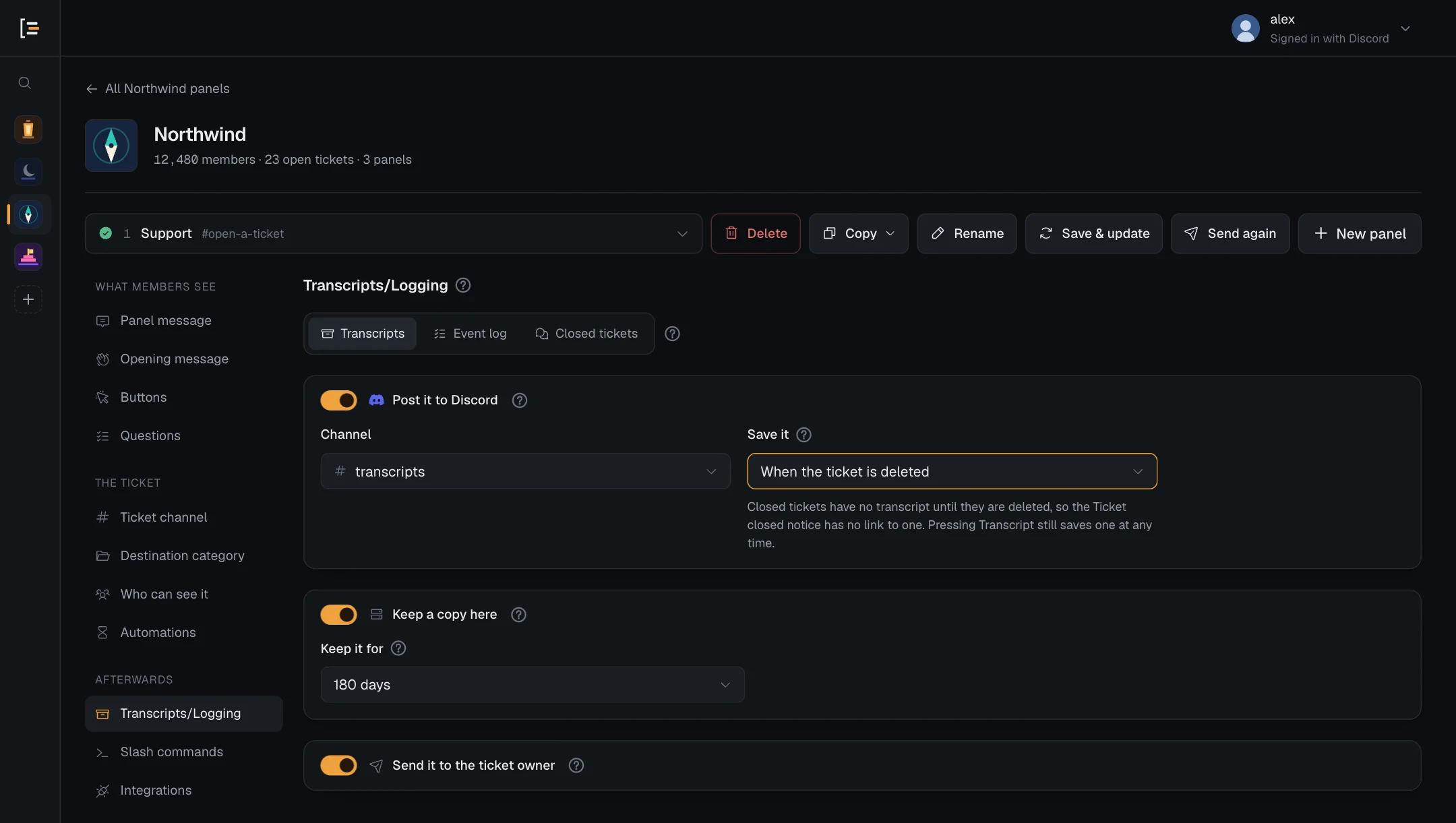
| When the ticket is deleted | Nothing is saved at the close, so the Ticket closed notice, the close message to the member, Closed for inactivity and the Ticket closed webhook have no transcript link. The transcript is saved right before the channel goes, by the Delete button or the automatic delete. |
The link is the {transcript.link} variable. It is not in the default messages, so add it to the ones that should carry it. Variables says what it becomes in each message.
With When the ticket is deleted, the screen shows this note under the field: "Closed tickets have no transcript until they are deleted, so the Ticket closed notice has no link to one. Pressing Transcript still saves one at any time."
#Any delete saves a ticket that has no copy
Either way, a ticket deleted with no copy since its last close is saved right before it goes. That covers a ticket deleted while still open, one that closed while the panel was set to When the ticket is deleted, and one whose save at the close made no copy.
A copy saved by hand after the close counts, so with When the ticket closes a later delete does not save a second one. With When the ticket is deleted, every delete through Sortr saves, even when the ticket already has a copy.
The Delete button asks once before it deletes, in a reply only the person who pressed it sees, and says what becomes of the conversation: "A transcript is saved first.", "Its transcript is already saved." or "No transcript is kept, because transcripts are switched off for this panel." The automatic delete follows the same rule without asking.
Sortr saves before it posts the Before deletion message, so that message can link to the copy with {transcript.link}. The Ticket deleted webhook carries the link to the copy that delete saved too. What Delete does, step by step.
#Save one by hand
- In Discord.
/transcriptinside a ticket saves the conversation so far at any time, even while the ticket is open, and the Transcript button on the closed notice does the same while it is closed. The copy goes to the Discord channel and the Sortr site if the panel has them switched on, never to the member's DMs, and the person who asked also gets the file in a reply only they can see. A file too large for Discord in your server is left off that reply, which says "It's too large to attach here." and links the copy on the Sortr site when one was kept. The button and the command save at most once per ticket every 2 minutes. Who can use them is set under Ticket buttons and Slash commands. - From the dashboard. A closed ticket with no copy on the Sortr site can be saved with Save transcript under Closed tickets while its channel still exists.
Every save makes new copies: a new post in Discord and a new copy on the site, for whichever of those are on. A ticket keeps its first site copy and its 3 newest: saving more removes the older ones in between, and their links stop working. The event log says so under Retention purge, as "Older transcript copies removed". Posts in Discord are never removed this way.
#What is never saved
- A channel someone deletes by hand in Discord is never saved, whichever choice you pick.
- With all three places switched off, nothing is saved when a ticket closes or is deleted. Only Save transcript under Closed tickets still keeps a copy.
- With When the ticket is deleted, a ticket that is never deleted through Sortr has no transcript unless someone saves one by hand. Press Delete on closed tickets, or switch on the automatic delete.
#Choose where it goes
There are three places, each with its own switch. Turn on any mix.
| Setting | What it does | Default |
|---|---|---|
| Post it to Discord | Posts one message per transcript in a channel you pick, with the conversation attached as an HTML file. It stays as long as the message does. Sortr never deletes it. | On |
| Channel | Where that post goes. Same as the log channel uses the channel set under Event log. The list offers only channels Sortr can post the file in. A saved channel that is no longer offered shows in red with the reason: "(deleted channel)", "(Sortr can't see it)", or its name with "(Sortr can't post here)". | Same as the log channel |
| Save it | When the transcript is saved, for all three places: When the ticket closes or When the ticket is deleted. See above. Greyed out while all three places are switched off. | When the ticket closes |
| Keep a copy here | Keeps an encrypted copy on the Sortr site, readable from its private link and from Closed tickets. | On |
| Keep it for | How long the site copy is kept while Sortr is in your server. A closed ticket's form answers and subject follow it too, counted from the close. See below. | 90 days |
| Send it to the ticket owner | Sends the member who opened the ticket the same post and file by direct message. | Off |
- Open the panel. In the dashboard, pick your server, then the panel.
- Go to Transcripts/Logging. It is in the left menu under Afterwards. The Transcripts tab opens first.
- Switch on the places you want. For the Discord post, pick a Channel, or leave it on Same as the log channel.
- Pick the moment. Under Save it, choose When the ticket closes or When the ticket is deleted.
- Save. Press Save changes. The next ticket that closes or is deleted follows the new settings.
Careful. Post it to Discord needs somewhere to post. On Same as the log channel with no log channel set, or with a channel that has been deleted or that Sortr can't see or post the file in, nothing is posted in Discord. The screen says so under Channel, and each time it happens Sortr records the problem in the event log ("Transcript not posted in Discord", or a Missing Discord permission entry), which you can read only if that panel has a log channel. A ticket opened through another panel's option follows the settings of the panel it opens: that panel's transcript settings and that panel's channels, not those of the panel whose post the member pressed. Check Transcripts/Logging on every panel your options open.
A panel made with Create a new panel from an option starts with the transcript channel and the event log channel of the panel you made it from. A panel made with New panel starts with neither.
With all three switched off, the screen says "All off, so nothing is kept when a ticket closes or is deleted." Pressing Transcript still hands the file to whoever pressed it, and Closed tickets still offers Save transcript while the channel exists.
#The post in Discord
The post names the member who opened the ticket, the ticket channel, the panel, how to open the transcript, and everyone who wrote in it with how many messages each, busiest first. When a site copy is kept, a Direct Link button under the post opens the transcript in the browser.
You can reword this post. It is the Transcript log entry under Ticket Messages.
Pick a channel only your staff can read: this copy holds everything in the ticket, staff notes included. When every member of the server can read the channel, the screen shows an amber note: "Everyone in the server can read this channel, so transcripts posted here are public. Pick a staff-only channel." On Same as the log channel it reads "Everyone in the server can read the log channel, so transcripts posted there are public. Pick a staff-only channel here."
Sortr's role needs View Channel, Send Messages, Embed Links and Attach Files in that channel. On Same as the log channel that is the log channel, so the log channel then needs Attach Files as well. For a private channel, let Sortr's role in, in the channel's own permissions. If one is missing, nothing is posted, the event log gets a Missing Discord permission entry, and the warning "Sortr can't reach everything your panels use." on the server page names the channel.
#Send the member a copy
With Send it to the ticket owner on, the member who opened the ticket gets the same post and file by DM when the ticket closes or when it is deleted, whichever Save it is set to (no file from an age-restricted channel). A save by hand (Transcript, /transcript or Save transcript) is never sent to them. The Direct Link button on it needs Keep a copy here switched on too, and opens once they sign in with Discord. Only they, the server owner and members with Administrator can read that copy (see below).
Members with closed DMs are skipped. The Transcript saved entry in the event log says so, and Sortr does not try that member again for a day. A member who has had several direct messages from Sortr in the last hour, from any server, may not get another: the copy is then skipped, and the entry says Sortr could not DM them. This is separate from the Close message to the member, a short DM you can switch on under Ticket Messages.
#What the member's copy leaves out
When a ticket closes, the member loses access to the channel, so anything staff write after that is for staff only. Bots keep their access. If Discord refuses Sortr in that channel, for example when its role lacks Send Messages there, taking the channel away can fail, and the event log then names who may still be in. The copy on sortr.xyz (Keep a copy here) and the copy sent to the ticket owner stop at the close, and leave out what staff wrote while the ticket was closed before a reopen. A note at the top of the transcript says how many messages are not part of that copy. That holds also when an admin reads the site copy under Closed tickets.
The copy posted in Discord, and the file the Transcript button hands to whoever pressed it, hold everything in the channel. With Save it on When the ticket is deleted, the copy posted in Discord is taken right before the channel goes, so it also has what staff wrote after the close.
#Tickets taken over from Ticket Tool
A ticket Sortr took over from Ticket Tool may be one only some roles could see. So each time its transcript is saved with Post it to Discord on, Sortr checks the channel the post would go to. It posts there only when nobody can read that channel except the roles that could see the ticket, the server owner, Administrators and bots.
Otherwise nothing is posted in that channel. The copy is kept on the Sortr site instead, even when Keep a copy here is off and even past the limits on site copies (see Limits), and the event log gets a "Transcript kept on Sortr's site only" entry under Something went wrong. Only while Sortr is low on storage is it not kept, and the event log then says "Transcript not kept anywhere". That copy opens for the same people as any site copy, is listed under Closed tickets and is kept for as long as Keep it for says. The copy sent to the ticket owner is not affected. A taken-over ticket's transcript covers the whole channel, including what was written before Sortr took it over.
#Tickets in age-restricted (18+) channels
When a ticket's channel is marked Age-Restricted Channel in Discord at the moment its transcript is saved, Sortr keeps that transcript where only adults are meant to read it:
- The post in Discord goes only to a channel that is age-restricted too. Otherwise nothing is posted, and the event log gets "Transcript not posted in Discord" under Something went wrong: "Transcript not posted in Discord: the ticket's channel is age-restricted (18+) and the transcript channel #transcripts is not.", then "Mark the transcript channel as age-restricted in Discord, or pick one that is under Transcripts on the panel." It names the log channel instead when the post goes to Same as the log channel. The Channel list doesn't hide channels that aren't age-restricted, so check the one you pick.
- The member's DM never carries the file, only the Direct Link button and the line "This ticket was in an age-restricted (18+) channel, so the transcript isn't attached. The link asks you to confirm you're 18 or older." Without Keep a copy here there is no link, so no DM is sent, and the Transcript saved entry ends "Not sent to @member by DM: the ticket's channel is age-restricted (18+), so no file is sent by DM, and there is no site copy to link to".
- The transcript itself, on sortr.xyz and in the file, shows the ticket's details and keeps the conversation folded behind "18+ content. This ticket was in an age-restricted channel. Open it only if you are 18 or older." until the reader presses I'm 18 or older, show it. Copies saved before Sortr did this open without it.
#How long site copies are kept
Keep it for offers 30 days, 90 days, 180 days, 1 year and Until deleted by hand. The default is 90 days, counted from when the copy was saved. Sortr checks once an hour and removes copies past their time, and logs a Retention purge. The post in Discord and its file are never touched.
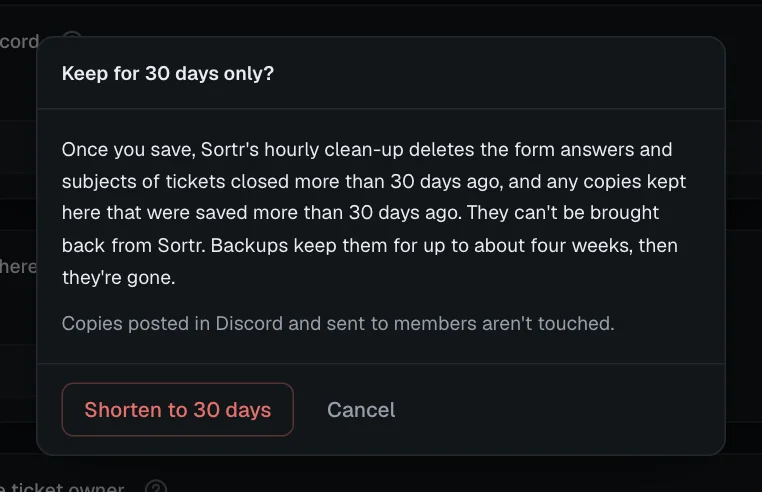
The setting applies to copies already saved, and to the form answers of tickets already closed (see below). So picking a shorter period asks first, in a window titled with the period you picked, such as Keep for 30 days only?. It says that once you save, the next hourly check deletes the form answers and subjects of tickets closed longer ago than that, and the copies kept here saved longer ago, that they can't be brought back from Sortr (backups keep them for up to about four weeks, then they're gone), and that copies posted in Discord and sent to members are not touched. Shorten to 30 days goes ahead; Cancel keeps the period you had. A longer period does not ask, and Until deleted by hand counts as the longest.
Copies are only ever kept for one of these periods, the ones the Privacy Policy lists. A length set some other way, such as by an older setting, counts as the longest of them that isn't longer, and at least 30 days: 120 days counts as 90, and 2 years as 1 year.
When Sortr is removed from your server, every site copy of every ticket is deleted 30 days later, whatever Keep it for says, with everything else Sortr holds for the server. Add Sortr back within those 30 days and nothing is deleted. Transcripts posted in Discord stay. Until then, the site links still open for the people allowed to read them. See Privacy and data.
Good to know. If you delete a panel, its tickets keep the settings the panel had at that moment, so their site copies are kept for as long as Keep it for said then. That can no longer be changed afterwards, so set it before you delete the panel.
To remove a ticket's site copies sooner, delete them by hand in Closed tickets. Delete there removes every site copy of that ticket at once.
#Form answers and ticket records
Keep it for also sets how long Sortr keeps a closed ticket's form answers and its subject, whether or not Keep a copy here is on, so you can choose it with copies switched off too. Its ? says so. They are deleted once that period has passed since the close, not since a save. With Until deleted by hand, they go a year after the close.
The ticket's own record, its number, who opened it and when, goes a year after the close, but never while its channel is still in your server or a copy of its transcript is still on the site. Open tickets are never touched, and a reopened ticket starts counting again at its next close. Ticket numbers are never reused.
Nothing in Discord is deleted this way: the answers shown in the ticket channel and the transcript posts stay as long as their messages do. Rows already in your Google Sheet and events already sent to webhooks stay too. Each removal is logged under Retention purge, with counts only.
#Who can open a transcript link
Transcript links on the site (sortr.xyz/t/…) are private. The page opens only after signing in with Discord, and only for:
- the member who opened the ticket, and
- the server owner and members with the Administrator permission.
Someone who is not signed in sees "Sign in to read this transcript", and comes straight back to it after signing in. Anyone else, support roles without Administrator included, sees the same "No such transcript" page as for a deleted, expired or mistyped link, so the page never tells them whether a transcript exists.
Support staff without Administrator can read the file on the Discord post instead.
Every page at a transcript link ends with "Problem with Sortr, or want to report misuse? team@sortr.xyz · Privacy policy", with links to both, older transcripts included.
In a server that requires 2FA for moderator actions, an Administrator also needs two-factor authentication on their own Discord account. Without it they see a page titled "Two-factor authentication required" instead of the transcript. The owner, and the member who opened the ticket, are not affected. See Servers that require 2FA.
A Discord account blocked from Sortr can open only the transcripts of its own tickets. In a server the people who run Sortr have blocked, only the member who opened each ticket can open its transcript: the owner and Administrators see "No such transcript".
Sortr opens up to four transcripts at a time across all servers, fewer when they are large. When it is busy, the link shows a page titled "Sortr is busy": "A lot of transcripts are being opened right now. Reload in a moment." A second one opened by the same Discord account, in any browser, waits for the first, for up to 8 seconds; a third at once, or a second still waiting after that, shows "One at a time": "Another transcript is still opening for your account. Wait for it, then reload." A transcript that takes more than a minute to download is cut off.
Each time someone opens a site copy, from its link or the dashboard, Sortr can log a Transcript opened entry. It is off by default, and logs one person opening the same transcript at most once every 30 minutes.
#Limits
- 5,000 messages. A ticket with more keeps its first 5,000, with a note at the top saying the rest were left out.
- 12 MB per transcript. A transcript file that would be larger keeps the messages from the start that fit, and leaves out the rest. The note at the top then starts "This ticket was too long to keep whole." and says how many messages it holds.
- The first and the 3 newest site copies per ticket. Saving more removes the older ones in between. See Save one by hand.
- 1 GB of site copies per server, 3 GB per owner. Once a server's copies on the Sortr site take more than 1 GB together, or the copies of every server with Sortr that the same Discord account owns take more than 3 GB together, or while Sortr is low on storage, a new site copy is not kept. The post in Discord and the copy for the ticket owner still go, and the event log gets a "Transcript not kept on Sortr's site" entry under Something went wrong. It says "This server's saved transcripts take more than 1024 MB, so no new copy is kept on the site. Delete old ones under Closed tickets, or choose a shorter Keep it for.", "The saved transcripts of every server this server's owner owns take more than 3 GB together, so no new copy is kept on the site. Delete old ones under Closed tickets, or choose a shorter Keep it for." or "Sortr is low on storage right now, so no copy was kept on the site. The copy in Discord, if any, was still posted." The last one also shows while the site copies of all servers together take more than 40 GB. Delete old copies under Closed tickets, or shorten Keep it for. A ticket taken over from Ticket Tool whose copy is kept off Discord is kept past these limits (see above).
- Saves take turns. Sortr builds two transcripts at a time across all servers, and one at a time for each server. When 10 saves are already waiting for your server, a save by hand (the Transcript button,
/transcriptor Save transcript) is refused with "Sortr is saving many transcripts for this server right now. Try again in a few minutes." Saves at a close or a delete are never refused: they wait their turn. A save at the close that fails is logged as "Transcript not saved at the close", under Something went wrong. - File size. The file is attached to the post only if Discord accepts its size: 20 MB in most servers, 50 MB at boost level 2, 100 MB at level 3, and 20 MB in DMs. A larger transcript is posted without the file. When a site copy is kept, the Direct Link button opens it as usual. Without one, the post says "The file was too large to attach". Discord takes 10 files on one message, so a post whose Transcript log entry has uploaded images keeps 9 of them beside the file.