DocsAfterwards
Event log
Post a short message in a Discord channel whenever something happens around your tickets, and choose which events count.
The event log posts a short message in a channel of your choice each time something happens: a ticket opens or closes, someone is added, a setting changes, or Sortr runs into a problem. You choose which of the 37 events are posted. Two of them are always on.
Dashboard › your server › a panel › Transcripts/Logging › Event log
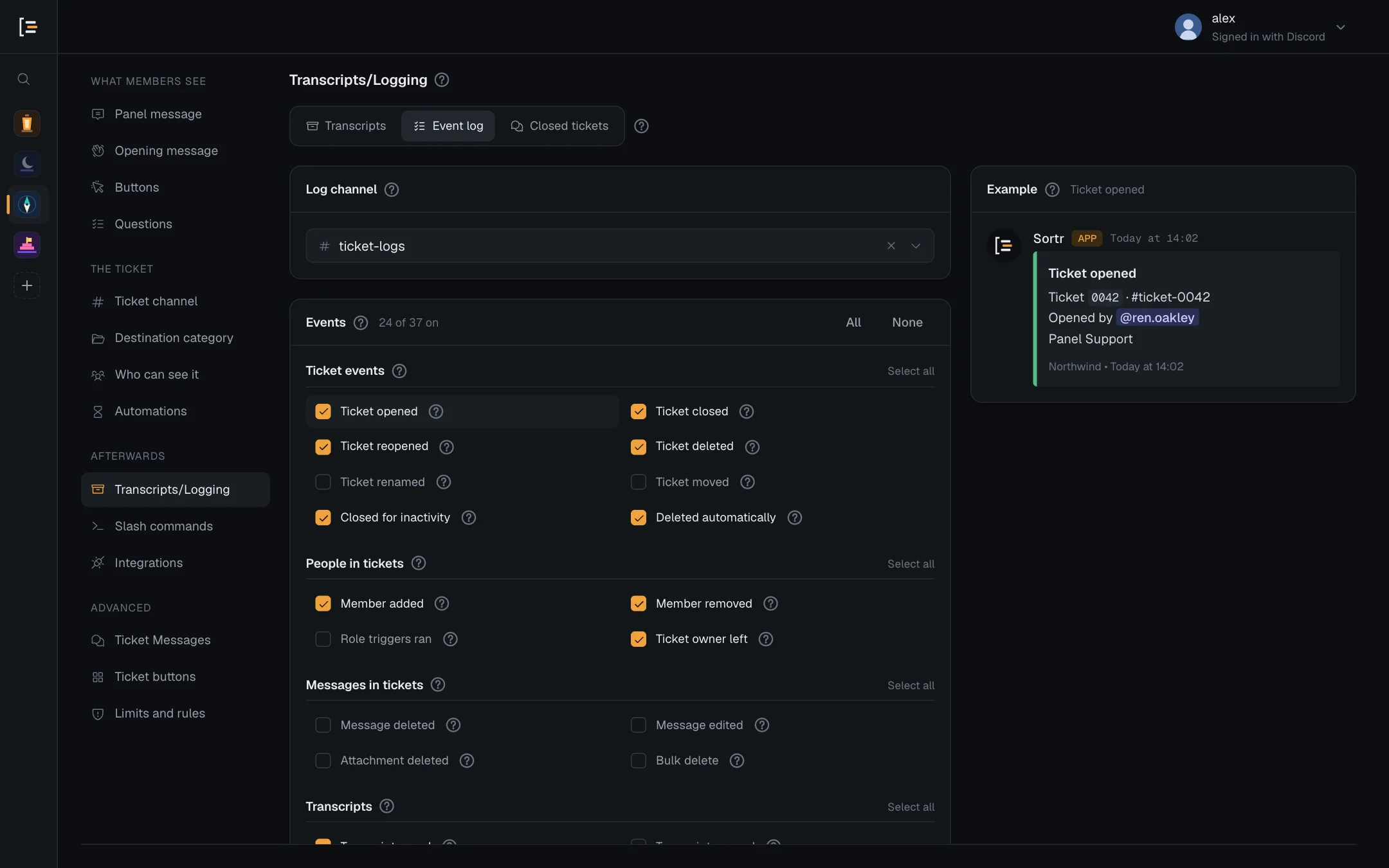
#Choose a log channel
- Open the panel. In the dashboard, pick your server, then the panel.
- Go to Transcripts/Logging, then Event log. Transcripts/Logging is in the left menu under Afterwards.
- Pick the channel. Under Log channel, choose where posts go. Only channels Sortr can post in are listed.
- Tick the events. Under Events, tick the ones you want. All and None set every event at once, and each group has its own Select all or Clear. Click an event's name to see an example beside the list.
- Save. Press Save changes.
Each panel has its own log channel and its own choice of events, and a ticket is logged by the panel it was opened with. For one log covering the whole server, pick the same channel on every panel. A panel made with Create a new panel from an option starts with the log channel of the panel you made it from. To stop posting, clear the channel with the × beside its name.
A ticket Sortr took over from Ticket Tool is logged by the panel it was filed under, but only posted in that panel's log channel if nobody outside the roles that could see the ticket can read that channel (the server owner, Administrators and bots aside), both when it was taken over and when each entry is posted. Otherwise its entries are recorded but not posted, so a ticket only some roles could see is never written up where the others read.
Tip. Keep the log channel private to staff. Everyone who can see it reads every post, including the start of deleted and edited messages if you log those. When every member of the server can read the channel you picked, the screen shows an amber note: "Everyone in the server can read this channel, so log posts here are public. Pick a staff-only channel."
#What Sortr needs in the channel
Sortr needs View Channel, Send Messages and Embed Links in the log channel, plus Attach Files if your transcripts are posted there too. A private staff channel has to let Sortr's role in with them, in the channel's own permissions (see Private categories and channels). If Sortr cannot post, it skips the post rather than trying again and again, and the event is still recorded (see below). Saving the panel makes Sortr try a channel it had given up on straight away.
The screen tells you when posts cannot go out:
- No channel picked. It says "No channel picked, so nothing is posted. Sortr still records the events ticked below and keeps them for 90 days."
- The channel was deleted. The field shows "(deleted channel)" and the screen says "The log channel no longer exists, so nothing is posted. Pick another."
- Sortr can't see the channel. When the channel is private and Sortr's role is not let in, the field shows "(Sortr can't see it)" and the screen says "Sortr can't see the log channel, so nothing is posted. Let Sortr's role in with View channel, Send messages and Embed links, or pick another."
- Sortr can no longer post there. A saved channel Sortr can see but no longer post in shows as "#staff-logs (Sortr cannot post here)", with "Sortr can no longer post in #staff-logs, so nothing is posted there. Give Sortr View channel, Send messages and Embed links in it, or pick another."
#Every event
The events come in the same groups as on the screen. "On" means ticked for a new panel. "Always" means the event cannot be switched off: the screen shows it ticked, with a lock, and All, None and Clear leave it alone.
#Ticket events
| Event | Posted when | Default |
|---|---|---|
| Ticket opened | A ticket opens, from a panel button, a menu or /new. Names the channel, the member and the panel. When staff open a ticket for someone with /new, the entry reads "Opened by" the staff member "for" the member. | On |
| Ticket closed | Someone closes a ticket with the Close button or /close. Says who, how long it was open (leaving out any time it sat closed before a reopen), and the reason if one was given. | On |
| Ticket reopened | A closed ticket is reopened. | On |
| Ticket deleted | Someone deletes a ticket with the Delete button, or a ticket channel is deleted directly in Discord, titled "Ticket channel deleted". That includes a channel deleted while Sortr was offline, logged once it is back, and one already gone when its automatic delete came due. When the delete saved a transcript first, the entry adds "Transcript saved before deletion", or "The transcript could not be saved before deletion" when the save made no copy. | On |
| Ticket renamed | A ticket channel's name changes, including Sortr's own renames when a ticket closes or reopens. | Off |
| Ticket moved | A ticket channel moves to another category, including Sortr's own moves when a ticket closes or reopens. | Off |
| Closed for inactivity | Automations closes a quiet ticket. | On |
| Deleted automatically | Automations deletes a closed ticket once its time is up. Says how long ago it closed and the panel's Delete after setting, with the same transcript line as Ticket deleted. | On |
Transcripts explains when a delete saves a transcript.
#People in tickets
| Event | Posted when | Default |
|---|---|---|
| Member added | Someone, or a role, is added to a ticket or another channel with /add. Outside a ticket it goes by the server's oldest panel's log settings, and is posted only in a log channel whose readers, bots aside, can all see the channel they were added to. | On |
| Member removed | Someone is removed with /remove. | On |
| Role triggers ran | Roles are given or taken when a ticket opens or closes: the panel's role triggers, and the roles of the option the ticket was opened with. A ticket deleted while still open gets the closing roles then. Marks any that failed. | Off |
| Ticket owner left | The member who opened a ticket leaves the server while it is still open. | On |
#Messages in tickets
These only cover ticket channels, never the rest of your server. Deleted and edited messages from bots are not logged. Each member's edits are logged at most 5 a minute, and their deleted messages at most 5 a minute; any more in that minute are neither posted nor recorded, so one member cannot flood the log channel.
| Event | Posted when | Default |
|---|---|---|
| Message deleted | A message in a ticket is deleted. The post quotes its first line, up to 120 characters, when Sortr still had it. | Off |
| Message edited | A message in a ticket is edited. The post shows its first line before and after, up to 120 characters each. The earlier text is only there when Sortr still had it. | Off |
| Attachment deleted | A message with files attached is deleted in a ticket. The post names the files. | Off |
| Bulk delete | Several messages in a ticket are removed at once. | Off |
#Transcripts
| Event | Posted when | Default |
|---|---|---|
| Transcript saved | A transcript is saved. Says how many messages, where the copies went, and whether the member's DM got through. When no copy was kept anywhere, the entry is titled "Transcript not saved" instead. | On |
| Transcript opened | Someone opens a site copy, from its link or the dashboard. At most once per person and transcript every 30 minutes. | Off |
| Transcript deleted | Someone deletes a ticket's site copies in Closed tickets. Says how many went, such as "3 site copies deleted by" the person, and that the Discord copies are untouched when there are any. | On |
| Retention purge | The hourly clean-up removes site copies older than the panel's Keep it for. It also counts closed tickets whose form answers and subjects it removed, past that period, and deleted tickets' records it removed, a year after their close. Also posted, titled "Older transcript copies removed", when a save removes a ticket's older site copies: Sortr keeps its first and its 3 newest. | On |
#Refused opens
| Event | Posted when | Default |
|---|---|---|
| Ticket limit reached | A member is turned away by an open or closed ticket limit, or because the server is close to Discord's 500 channel limit. The second also brings an always-on Server almost out of channels entry: see Sortr health. | Off |
| Cooldown hit | A member tries to open a ticket before their cooldown has run out. | Off |
| Blocked member tried | A member with a blocked role tries to open a ticket, or a member picks a button or menu option that is not for their role. The second reads, for example, "cannot use the Billing option: it is set to certain roles". | On |
| Outside support hours | A member tries to open a ticket outside support hours. | Off |
A member refused again and again for the same reason is logged once every 10 minutes, so pressing a button on repeat makes one entry. A refusal because an option is not for the member's role is logged by the panel the option is on. The rules are set under Limits and rules, and who can use an option under Buttons.
#Configuration changes
| Event | Posted when | Default |
|---|---|---|
| Settings changed | A save changes this panel's categories, channel names, role triggers, limits, rules, automations, logging, numbering, transcripts, pinning, Google Sheet, webhooks or slash commands. Says what changed and who saved. For slash commands it also says which command was switched on or off or given other roles, for example "Changed: slash commands (/close switched on, /new roles changed)". Also posted when Import from Ticket Tool creates panels ("Imported from Ticket Tool", in the log channel of the first panel it made) and when Sortr takes over Ticket Tool's open tickets ("Ticket Tool tickets taken over", one entry per log channel, naming only the tickets logged there). | On |
| Staff permissions changed | A save changes the support team, ticket permissions or access levels. | On |
| Panel posted, updated or deleted | In the dashboard, a panel is sent to a channel, its post is updated, or the panel is deleted. An Update that changes nothing is not logged. Also posted, titled "Ticket Tool panel replaced", when Sortr removes the Ticket Tool panel one of your panels replaced. | On |
| Bot message edited | A save changes the opening message, the panel message, other bot messages or which of them are sent, the ticket buttons, the questions, or the buttons and menu options members open a ticket with, including who can use an option and the roles it gives. | Off |
| Integrations changed | Where the server's ticket data goes, or where it is all logged, changes: a webhook is added, removed, pointed somewhere else, switched on or off or given a new secret; the Google Sheet link changes or its export is switched on or off; the log channel moves; or any log event is switched off. Webhooks are named by their site only, such as hooks.zapier.com, and the sheet by the last four characters of its spreadsheet id, never the link. Says who did it. Also posted when a deleted panel's webhooks are kept or stopped, and, titled Integrations paused, when Sortr switches off what someone connected because they lost Administrator, left the server, or handed it on as its owner without keeping Administrator, or switches off what has no record of who connected it. | Always |
| Commands registered or removed | A save adds a slash command to the server's list or removes one from it. The entry is titled "Slash commands changed", names the commands, and is logged in the panel that was saved. It never names /help, which every server has. | On |
Commands registered or removed is made only when a command is added to the server or removed from it. Switching a command on in a panel while another panel already has it on adds nothing to the server, and changing the roles under a command's Who can use it changes who can use it and who Discord lists it for, not which commands exist, so neither makes that entry. Both are in the panel's Settings changed entry instead. Slash commands explains the roles.
A save cannot hide itself. Its Settings changed, Staff permissions changed and Bot message edited entries are logged when the event was ticked before the save or after it, so switching an event off in the same save still logs that save. When the save moves the log channel, its entries are posted in the old channel and the new one. Integrations changed works the same way, and is always on.
#Sortr health
| Event | Posted when | Default |
|---|---|---|
| Missing Discord permission | Sortr cannot do something because it lacks a permission. Says what it needs and where, and what to give Sortr's role, for example "Give Sortr's role Manage Channels in Server Settings, Roles, or press Re-add Sortr on this server's page in the dashboard." when a ticket could not open. That includes a rename or move Discord refused when a ticket closed or reopened, titled "Could not rename a ticket" or "Could not move a ticket", and files a member attached to a form that Sortr could not post in the ticket, titled "Sortr could not post the files attached to a form", with "Give Sortr's role Attach Files in Server Settings, Roles (or press Re-add Sortr in the dashboard), so the files members attach reach the ticket." Entries about who could not be let into or out of a ticket are listed below. It also covers "Could not close a quiet ticket", when Automatic close is due but Sortr can't manage the channel any more. | On |
| Category full | Every category in a list is full (Discord allows 50 channels in a category) and Sortr did not create another. See below. | On |
| Server almost out of channels | A ticket could not open because the server has 470 channels or more, close to Discord's limit of 500. Posted as "Server is almost out of channels", with how many channels the server has, at most once an hour. It says nobody can open a ticket until some are freed, and suggests deleting closed tickets or switching on Automatic delete. | Always |
| Category created | Every category in a list was full, so Sortr created the next one. Names the new category, the list and the panel, the category its permissions were copied from, any permissions Sortr could not copy, and the ticket it was made for. | On |
| Panel message gone | A posted panel message is deleted from its channel, so nobody can open a ticket from it. | On |
| Rate limited by Discord | Discord slows Sortr down, so some actions finish late. At most one post a minute. | Off |
| Something went wrong | Sortr could not finish a step, with the step and Discord's error. It also carries "Transcript not posted in Discord", when Post it to Discord is on and there is no channel to post in, or the ticket's channel is age-restricted (18+) and that channel isn't (see Transcripts); "Transcript kept on Sortr's site only", when a ticket taken over from Ticket Tool would have posted its transcript where others can read it (see Transcripts); "Transcript not kept on Sortr's site" or "Transcript not kept anywhere", when a site copy could not be kept (see Transcripts); "Transcript not saved at the close"; and a rename or move at a close or reopen that failed for another reason. The usual one is Discord's limit on renames: "Discord allows two renames per channel every ten minutes, so this one was skipped. Rename it by hand if the name matters." | On |
When something in this group appears, Permissions and Troubleshooting explain the fix.
#When people could not be let in or out
If Discord refuses Sortr in a ticket's channel, for example when its role lacks Manage Permissions there, changing who is in the ticket can fail. Sortr then says so, naming the people involved, and says what to let Sortr's role in with, such as "Sortr needs Manage Permissions on the channel: let Sortr's role in with it, in the channel's or its category's permissions." These come under Missing Discord permission, or under Something went wrong when Discord refused for another reason:
- "Could not lock the ticket owner out" or "Could not lock everyone out of a closed ticket": a close could not take everyone's access away. It names who may still be able to read or write in the ticket.
- "Could not let everyone back into a reopened ticket": a reopen could not give everyone their access back. It names who is still locked out.
- "Could not add a member", "Could not add a role" and "Could not remove a member":
/addor/removecould not change the channel. "A member was added with less access" and "A role was added with less access": they were let in without the permissions it names. - "Support roles not updated on every ticket": a save changed the panel's support roles, and the tickets it names kept their old ones.
- "Sortr cannot make a ticket private": no ticket was opened, because Sortr could not hide it from @everyone or let itself in.
- "Sortr could not pin the opening message" (or, on a ticket taken over from Ticket Tool, "Sortr could not pin a taken-over ticket's message").
Bots in a ticket, Ticket Tool's included, keep their access when it closes. Permissions lists what Sortr needs for each.
#What a Category full entry says
Each entry names the ticket and the panel.
- New tickets. The entry is titled "Every category is full" and says the ticket is being created without a category.
- Closed tickets. The entry is titled "Every closed-ticket category is full" and says the ticket stays where it is. It is only made when Where closed tickets move is set to create categories. Without that, a closed ticket stays where it is and nothing is logged.
- Why no category was created. When the list has Create a new category when these are full switched on, the entry adds a line starting "No new category was created:" with the reason, such as the server being close to Discord's limit of 500 channels.
- Deleted categories. When none of the categories in the list is still in the server, the entry is titled "No category to put the ticket in" for a new ticket, or "No category to move the ticket to" for a closed one, and asks you to pick one.
Destination category explains what happens to the ticket and how to let Sortr create categories.
#Events are recorded even without a channel
Every event you have ticked, and those that are always on, is recorded by Sortr first and posted second. With no log channel, or a channel Sortr cannot post in, the post is lost but the record is kept. Records are deleted after 90 days. The dashboard has no screen for reading them: you see events only in the log channel.
An entry for a ticket taken over from Ticket Tool that may not be posted in the panel's log channel (see above) is recorded the same way.
A record says what happened, when, in which ticket and who did it. The text of deleted or edited messages and the names of deleted files only go into the Discord post, and are never stored. Events you have not ticked are neither posted nor recorded, apart from those that are always on. More in Privacy and data.
#Good to know
- Server-wide events. Rate limited by Discord belongs to the whole server, not one panel. It is posted by the oldest panel that has it ticked and a log channel set. Commands registered or removed is logged in the panel whose save changed the commands. Set the same log channel on every panel to be sure you see both.
- Busy moments. Posts go out in order, one server at a time. If more than 50 are waiting for your server, the extra ones are recorded but not posted. Missing Discord permission, Category full, Panel message gone, Integrations changed and Server almost out of channels are posted all the same.
- Transcripts in the same channel. If your transcripts use Same as the log channel, the transcript posts and the log entries share this channel.