DocsWhat members see
Google Sheets
Copy every submitted form into a Google Sheet you own, one row per ticket, as it comes in.
Sortr can copy the answers from your Questions form into a Google Sheet, one row per ticket, moments after each form is sent. You share the sheet with Sortr like you would with a colleague, name the tab, and say which column each answer goes in.
Dashboard › your server › a panel › Questions › Google Sheet
#Before you start
- The sheet is filled from the form, so the form needs to be on. Tickets opened without a form add nothing.
- Each panel has its own sheet setting. A form belongs to the panel the ticket opens with, so if this panel's button opens another panel, set the sheet up on that panel's Questions screen.
- Only forms sent while the sheet is switched on are copied. Turning it on does not fill in older tickets.
- You need a Google account that can share the sheet.
- A spreadsheet belongs to one server: the first one to use it. If a panel in another server already has its link saved, with the export on or off, or another server used the sheet first, Sortr refuses it: "This sheet is connected to a server you don't manage. Use a different sheet.", or "This sheet is connected to another of your servers. Each server needs a sheet of its own." when you manage that server too. Several panels in the same server can share one sheet.
- A server keeps its sheet even after none of its panels links it any more. If you manage that server too, connecting the sheet here (with Check access or a save) moves it to this server. Otherwise it is freed only when that server's data is deleted, 30 days after it removes Sortr.
#Set it up
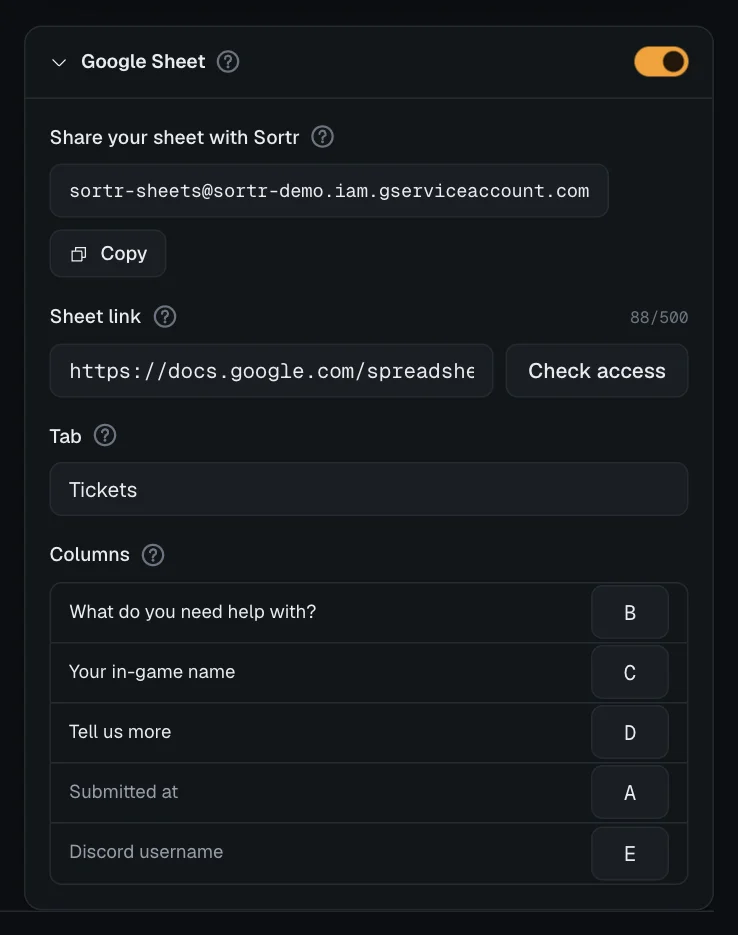
- Open the card. On the Questions screen, the Google Sheet card is under the Preview. It starts folded: press its name to open it, then switch it on with the switch in its header.
- Copy Sortr's email. Under Share your sheet with Sortr is the Google email Sortr writes as. Press Copy.
- Share your sheet. Open the sheet in Google Sheets, press Share, paste the email and choose Editor. Sortr can then write to that sheet and nothing else of yours.
- Paste the link. Copy the sheet's address from your browser or the Share window, and paste it into Sheet link.
- Let Sortr check it. A moment after you paste the link, Sortr opens the sheet without writing anything and tells you what it found (see below). Check access runs the same check again whenever you press it. You do not need to save first.
- Fill in Tab. Tab is the name of the tab the rows go to. Check access fills it in when the sheet has one tab, and lists the tabs for you to press when it has more. See The Tab field.
- Pick the columns. Under Columns, type a column letter beside each question you want copied, for example
A,BandC. Add the extra columns if you want them. - Save. Press Save changes. The next form a member sends lands in the sheet within moments.
Once the export is on and set up, the opening message of each ticket with answers ends with a small line telling the member: "Your answers are also sent to this server's own tools (a Google Sheet)." See Questions.
The card stays folded until you open it. It unfolds by itself when something in it needs you: Sortr could not write to the sheet, a setting in the card stops the panel from saving, or a check finds no tab by the name under Tab.
#The Tab field
Tab holds the name on the tab at the bottom of your sheet, such as Sheet1. Every form's row goes to the tab with that name. It can be up to 100 characters, and it is required while the sheet is switched on.
The quickest way to fill it in is Check access with Tab left blank. You can also type the name yourself. Capital letters do not matter, and neither do stray spaces at the start or end, so sheet1 finds a tab called Sheet1. Spaces inside the name have to match.
One of these lines can show under the field:
| Under Tab | What it means |
|---|---|
| Filled in from the sheet, which has this one tab. Save to keep it. | The sheet has one tab, and Check access typed its name for you. Press Save changes. |
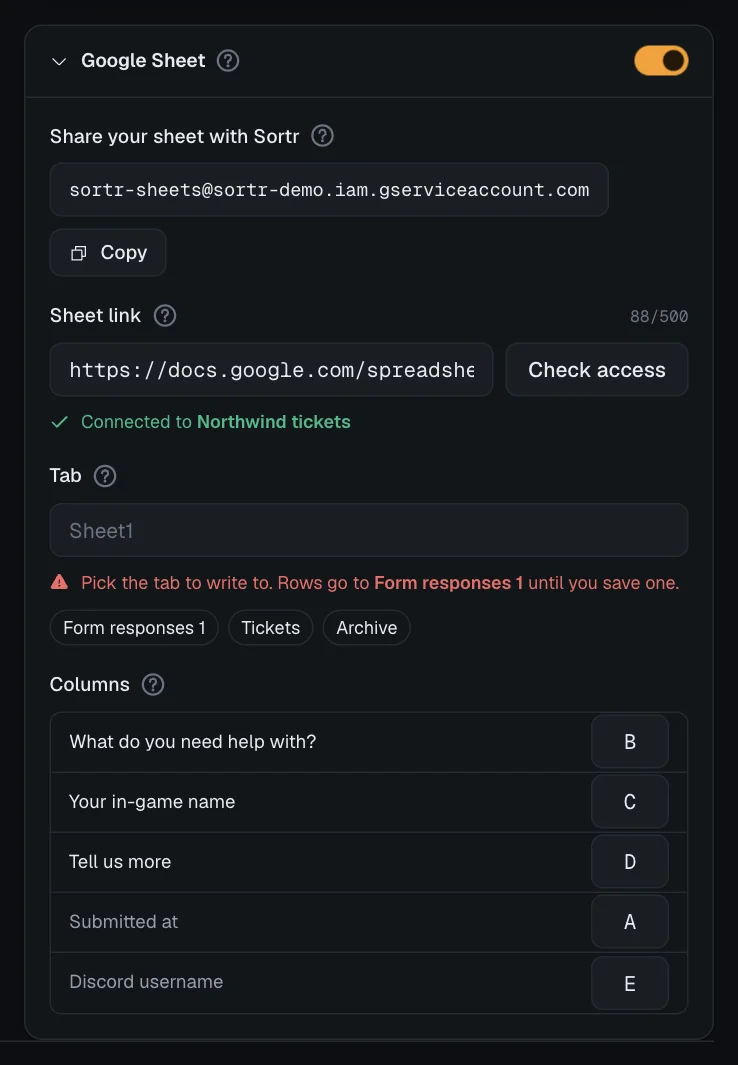
| Pick the tab to write to. | The sheet has several tabs. They are under the message as buttons: press the one you want. The first 24 are shown. For a tab further along, type its name. On a sheet connected before Tab existed, the line also says where rows go today, such as "Rows go to Sheet1 until you save one." (see below). |
| Your sheet has no tab called "the name you typed". Its tabs: | The name you typed is not a tab in that sheet. Press one of the tab buttons under the message, or correct the name. This is a warning: it does not stop you saving, but forms cannot be written until the name matches a tab. |
| Fill in Tab with the name of the tab to write to. | The sheet is on and Tab is blank. Save changes is blocked until you fill it in. |
- Only tabs with cells count. A tab that holds nothing but a chart is not listed and cannot be written to.
- Once you edit Sheet link or Tab, the card checks the sheet by itself a moment later, so a name the sheet does not have is flagged before you save. After that, the name you type is compared with the tabs the check found as you type, without asking Google again. Press Check access to look at the sheet afresh, for example after adding a tab in Google Sheets.
#If you rename the tab in Google Sheets
Sortr finds the tab by its name. If you rename it in Google Sheets, change Tab to the new name and save. Until you do, forms wait and are tried again every 30 minutes, and the card says the spreadsheet has no tab by the old name (see When Sortr cannot write). A form that still cannot be written three days after it was sent is given up.
#Sheets connected before Tab existed
A sheet that was connected before the Tab field existed keeps working. Its rows go where they always went: the tab named in its link (the part like #gid=0), or the first tab when the link names none.
- When you open Questions for that panel, Sortr checks the sheet once by itself. With one tab, it fills Tab in. With several, it lists them and says which one your rows go to today, for example "Pick the tab to write to. Rows go to Sheet1 until you save one." Pick that tab if you want them to stay there.
- Saving anything on that panel needs Tab filled in. Until then the save bar says "Fill in Tab with the name of the tab to write to." on every screen of the panel.
- Once a Tab is saved, the name decides where rows go, and the
#gidin the link is no longer used.
#What Check access tells you
Check access is greyed out until the link looks like a Google Sheet. Then it answers under Sheet link with one of these:
| Answer | What to do |
|---|---|
| Connected to your sheet · tab your tab (in green) | Nothing. Sortr can write there. The tab is named only when Tab matches a tab in the sheet. If answers were waiting, it adds "sending 3 waiting answers" and sends them now. |
| Sortr can view this sheet but can't edit it. Change its access to Editor. | In Google Sheets, open Share and change Sortr's access to Editor. |
| Sortr can't open that sheet. Share it with Sortr's email as Editor. | The sheet is not shared with Sortr yet. Share it, then check again. |
| That Google Sheet is gone, or the link is wrong. | Copy the link again from the sheet you mean. |
| This sheet is connected to a server you don't manage. Use a different sheet. | A panel in a server you do not manage already has this sheet's link, or that server used the sheet first. Use another sheet. |
| This sheet is connected to another of your servers. Each server needs a sheet of its own. | A panel in another server you manage already has this sheet's link. Use another sheet here, or take the link off that panel first. |
| Sortr is busy talking to Google. Try again in a minute. | Every server's checks share a small allowance with Google, and it is used up for the moment. Wait a minute and press it again. Forms going into sheets have their own allowance, so they are not held up. |
A link to a Google Doc or Form is refused with "That isn't a link to a Google Sheet. It starts with docs.google.com/spreadsheets." A missing tab is not an error here: the answer about the tab appears under Tab. A server can run 4 checks a minute across all its panels, and each panel 5 in a row, then 10 a minute; past that the answer is "Too many requests" with the seconds to wait.
#Columns
The Columns list has one row per question, then two extras. Type letters only, like A or AB, up to three. Leave a box blank and that answer is not written.
| Row | What goes in the cell |
|---|---|
| Each question | The member's answer, written as plain text. A formula stays as text, and a number like 007 keeps its zeros. An optional question left blank gives an empty cell. For a question that takes files, the cell gets the files' names, separated by commas, such as screenshot.png, error-log.txt, and stays empty when none were attached. The files themselves are only in the ticket. |
| Submitted at | When the ticket opened from the form, like 2026-09-23 14:05:09, which Google Sheets reads as a date. It uses the time zone set under Support hours on Limits and rules, which is UTC unless you changed it. Once Submitted at has a column, Submitted at, in lets you pick that zone here too. It is the same setting, so changing it here changes it under Support hours, and it applies even while support hours are off. |
| Discord username | The member's Discord username, such as ren.oakley, not their server nickname. |
#Header rows and where each row goes
Each form fills the next free row. Sortr looks down every column you mapped and writes below the lowest filled cell in any of them. So:
- A header in row 1 is kept, and the first form goes in row 2.
- Anything in columns you did not map is ignored when choosing the row.
- Do not put totals or notes under the table in a mapped column: the next form goes below them.
When the tab runs out of rows or columns, Sortr adds more.
#What Save checks
While the card is on, Save changes is blocked until the link is a Google Sheet link, Tab is filled in, at least one row has a column, every column is letters only, and no column is used twice. The save bar names the problem under Questions, starting with "Google Sheet:". Each problem also shows in the card, beside the box it is about. A Tab the sheet does not have is not one of them: the card warns about it, but the save goes through.
Saving a link to a sheet that another server's panel already has, or that another server used first, is refused with the same message as Check access gives. While the export is on, Sortr checks this on every save of the panel, not only when the link changes, so a save can be refused for it even when you changed something else.
#When Sortr cannot write
A ticket never waits for Google. Each form is queued and written moments later, oldest first, and a queued form survives a restart. If writing fails:
- Google is slow or down. Sortr tries again quietly, first after a minute, then waiting twice as long each time, up to every 30 minutes. If it keeps failing for about half an hour, the card shows the problem.
- Something needs you, such as the sheet not being shared, the sheet deleted, or no tab by the name under Tab. The card shows the problem straight away, and every form waiting for this panel is tried again every 30 minutes.
The problem appears in red at the top of the card, with the time it first came up (shown as "since 14:02", and unchanged by later tries) and how many answers are waiting, and the card unfolds to show it. Opening the panel also shows it once in a notice in the corner. It clears by itself after the next successful write.
When something needs you, the message is usually one of the answers in the Check access table, or one of these:
| In red on the card | What to do |
|---|---|
| That spreadsheet has no tab called "name". Check the name under Tab. | The tab was renamed or deleted. Put the tab's current name under Tab, and save. |
| The tab in that link is gone. Fill in Tab with the tab to write to. | Only for a sheet connected before Tab existed: the tab its link named was deleted. Fill in Tab, and save. |
| Another server has this spreadsheet connected too, so Sortr has stopped writing to it. Use a sheet only this server uses. | A panel in another server links the same spreadsheet, so Sortr writes to it for neither server. Connect a sheet only this server uses, or have the other server take the link off its panel. Switching its export off is not enough: a saved link counts either way. |
| This spreadsheet belongs to another server in Sortr, so Sortr won't write to it from here. Use a sheet only this server uses. | Another server used this spreadsheet first, so it stays with that server. Connect a sheet only this server uses. |
| That tab holds more than Sortr can read in one go. Point the export at a new tab or a new sheet. | Before each row, Sortr reads the columns you mapped to find the next free row, and Google's answer for this tab came to more than 16 MB. Start a new tab, or a new sheet, put its name under Tab or its link under Sheet link, and save. |
Forms waiting for a sheet are held for three days from when they were sent. A form that still cannot be written by then is given up. Its answers stay stored with the ticket, but it will not reach the sheet.
Once you have fixed the sheet, do one of these to send the waiting forms at once:
- Press Check access. If Sortr can edit the sheet and finds the tab, it sends them.
- Save a new link or a new Tab, or switch the card back on and save.
Waiting forms are written with the settings as they are saved. If the fix was a new link or tab name, save it.
#If you change the form later
Sortr writes each form using the columns as they are set when it writes, and matches each answer to its question, not to its position. So:
- Rewording or reordering questions is safe. Answers keep going to each question's column.
- Changing a question's column affects forms from then on, and any still waiting. Rows already in the sheet stay where they are.
- A new question has no column until you give it one. Older rows leave that column empty.
- Removing a question also removes its column setting, and its answers are no longer written, even for forms still waiting.
- Reset to default on the Questions screen makes new questions, so every question column has to be set again.
#Switching it off
Turn off the switch in the card header and save. Sortr stops writing, and the problem notice goes away. Forms still waiting are dropped, unless you switch the sheet back on within three days of when they were sent. Nothing already in your sheet is changed. To stop Sortr for good, remove its email from the sheet's Share settings too.
When Sortr is removed from the server, or the people who run Sortr block the server, forms still waiting are dropped the next time Sortr would write them, and nothing more is written.
#Who the export answers to
Sortr remembers who connected the sheet: whoever linked it, last changed the link, or switched the export back on. If that person loses the Administrator permission in the server, or leaves it, Sortr switches the export off and posts Integrations paused in the log channel, naming them and the spreadsheet. The server owner's export is not switched off this way while they own the server, but it is once they hand the server to someone else without keeping the Administrator permission. To keep it going, switch it back on and save: you are then the person it answers to.
An export that is on with nobody recorded, because nobody has linked the sheet, changed the link or switched the export on since Sortr began keeping this record, is switched off at Sortr's hourly check, with an Integrations paused entry that says "Sortr has no record of who connected these, so they are switched off". Switch it back on and save to keep it going. A save that links the sheet or switches the export on first asks Discord whether you are still the owner or an Administrator (see The dashboard).
Every change to the sheet link or the export switch is also logged under Integrations changed, which cannot be switched off. See Event log.
#If the card says it isn't set up
If the card reads "Google Sheets isn't set up on this Sortr yet.", the Sortr you are using has no Google account connected, so the export cannot work there. A sheet you set up earlier can still be switched off. If you see this on sortr.xyz, get in touch.